
Fluent Support vs Hive Support – Which WordPress Support Plugin Is Right for You?

Alright, you’ve got a WordPress site and are trying to figure out the best way to handle customer support, right? It’s a big deal! Happy customers mean repeat business and a good support system can build loyalty.
Two big players in the WordPress support plugin game are Fluent Support and Hive Support. Both promise to turn your customer service from a headache into a high-five. But which one is really the best fit for your business?
We’re about to dive deep into the Fluent Support vs Hive Support comparison, breaking down their features, pros, and cons. By the end of this, you’ll have a clear idea of which one is your perfect match. So grab a coffee and let’s get started!
Table of Contents
Overview of Fluent Support
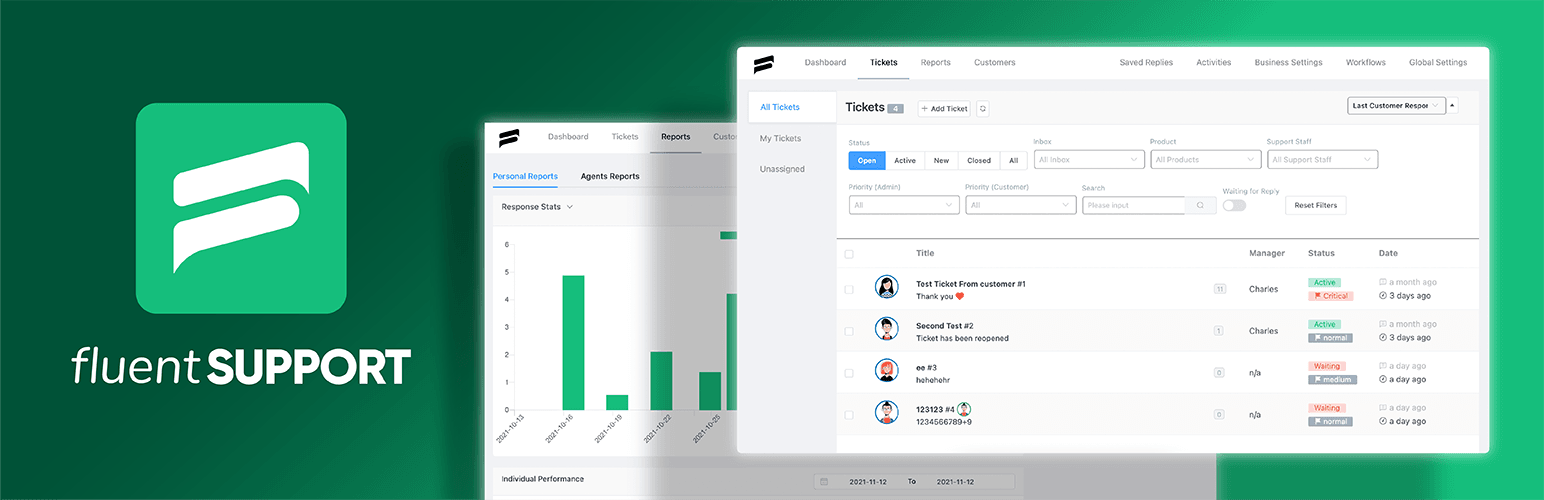
Fluent Support is a versatile customer ticketing plugin for WordPress. It’s designed to help users manage customer queries directly from the WordPress dashboard, offering premium features comparable to popular SaaS solutions like Zendesk, Helpscout, and FreshDesk.
This plugin will help you with the helpdesk and support ticketing system. It supports multiple customer agents with various permission levels and delivers detailed reports on customers and agents to enhance productivity.
From the ticket view, you can see a proper view of customers, including previous tickets, addresses, purchase history, and membership levels. This wealth of data can help in delivering more personalized and effective support.
It also has no limitations on tickets, support agents, users, products, tags, or channels, ensuring users have full control over their system and data.
Core Features Overview
- Ticketing System – Fluent Support offers a quite good and user-friendly interface with filtering options for managing support tickets. You can update, prioritize, and resolve queries effectively. Advanced filters improve response rates, and ticket statuses and tags help keep everything organized.
- Setup and Migration Capabilities – Setting up Fluent Support is as quick and easy as other WordPress plugins. Also, they have a migration facility from other help desk platforms.
- Business Perks and Inboxes – You can create separate inboxes for different parts of your business, preventing ticket clutter. The customizable ticket portal maintains your branding, and customer profiles provide easy access to necessary information. You can also map tickets to specific products.
- Automation and Workflows – Fluent Support also has automation and workflow functions. Automations eliminate repetitive tasks, saved replies enable fast responses, and clash detection prevents multiple agents from working on the same ticket. Additional features like bookmarks, notes, and mentions also come up with automation.
- Integration with FluentCRM – Fluent Support integrates with FluentCRM, allowing you to run campaigns and automation using support tags in your CRM.
- Pricing Plans and Options – Fluent Support offers pricing plans to suit various needs and budgets. They have three different packages such as single-site license, agency license, and 50-site license.
2. Overview of Hive Support

Think of Hive Support as your new companion in the customer service world. This advanced plugin is designed to make your support system smarter, faster, and way easier to use.
Imagine a support plugin that’s not only conventional but also has stay-ahead features! Hive Support comes with a built-in AI chatbot that’s like having a super-smart assistant working 24/7. You can even train it to answer your customer’s questions perfectly.
And that’s not all! Hive Support also has a handy automation system that lets you set up automated responses for common things. You can set up different types of automation with specific actions, conditions, and triggers. It’s like having a virtual assistant who knows exactly what to do and when to do it! No more repetitive work for you.
Want to see how your customer support is doing? Hive Support gives you a crystal clear picture of everything. You can see how many questions you’re getting, how long it takes to answer them, and even how your team is performing. Basically, it’s like having complete power to see exactly what’s going on!
Core Features Overview
- AI-enhanced Chatbot (ChatGPT integration) – Imagine having an energetic customer support agent who’s always ready to answer questions. That’s what you get with our AI chatbot, powered by ChatGPT. It can handle countless inquiries faster, 24/7, so your customers never have to wait on hold or get stuck in endless ticket chains.
- Ticket Management System – Keeping track of customer issues can be a huge problem. Not anymore! Our user-friendly ticket management system is like a digital cabinet for all your customer inquiries. You can easily monitor incoming tickets, prioritize based on urgency, and resolve them efficiently.
- Live Chat Functionality – Sometimes, customers need answers right away. That’s where our live chat feature comes in. It’s like having a virtual help desk right on your website, allowing you to connect with customers in real-time. Answer questions quickly, address concerns instantly, and keep customer interactions smooth and efficient.
- Reports and Analytics – Data is key to improving your customer support. Our comprehensive reports and analytics give you a complete picture of your ticket volume, agent performance, and overall customer satisfaction. Use this data to identify areas for improvement, make informed decisions, and boost your support team’s efficiency.
- Pricing plans and options – We understand that every business has unique needs and budgets. That’s why we offer a variety of flexible pricing plans to fit your specific requirements. Whether you’re a small startup or a large corporation, there’s a plan that gives you the best value for your investment. It’s essentially a custom-made solution for your customer support system, ensuring you get the most out of your resources.
3. Feature Comparison
So, we’ve been talking about Fluent Support and Hive Support, two plugins that can help you manage customer questions on your WordPress site. You’ve hopefully gotten a feel for what each one does by now.
Now, it’s time for a face-off! We’ll be comparing all the features of Fluent Support and Hive Support, head-to-head. This will help you decide which plugin is the perfect fit for you and your needs.
3.1 Ticket Management
Alright, let’s get down to the comparison! When it comes to support plugins, the most important feature is how they handle tickets. After all, if a plugin makes dealing with customer issues unwieldy, what’s the point?
So, to begin our comparison, we’re going to dive deep into the ticket management systems of both Fluent Support and Hive Support. We’ll see how Fluent Support handles tickets first.
Comparison Between Ticket Section
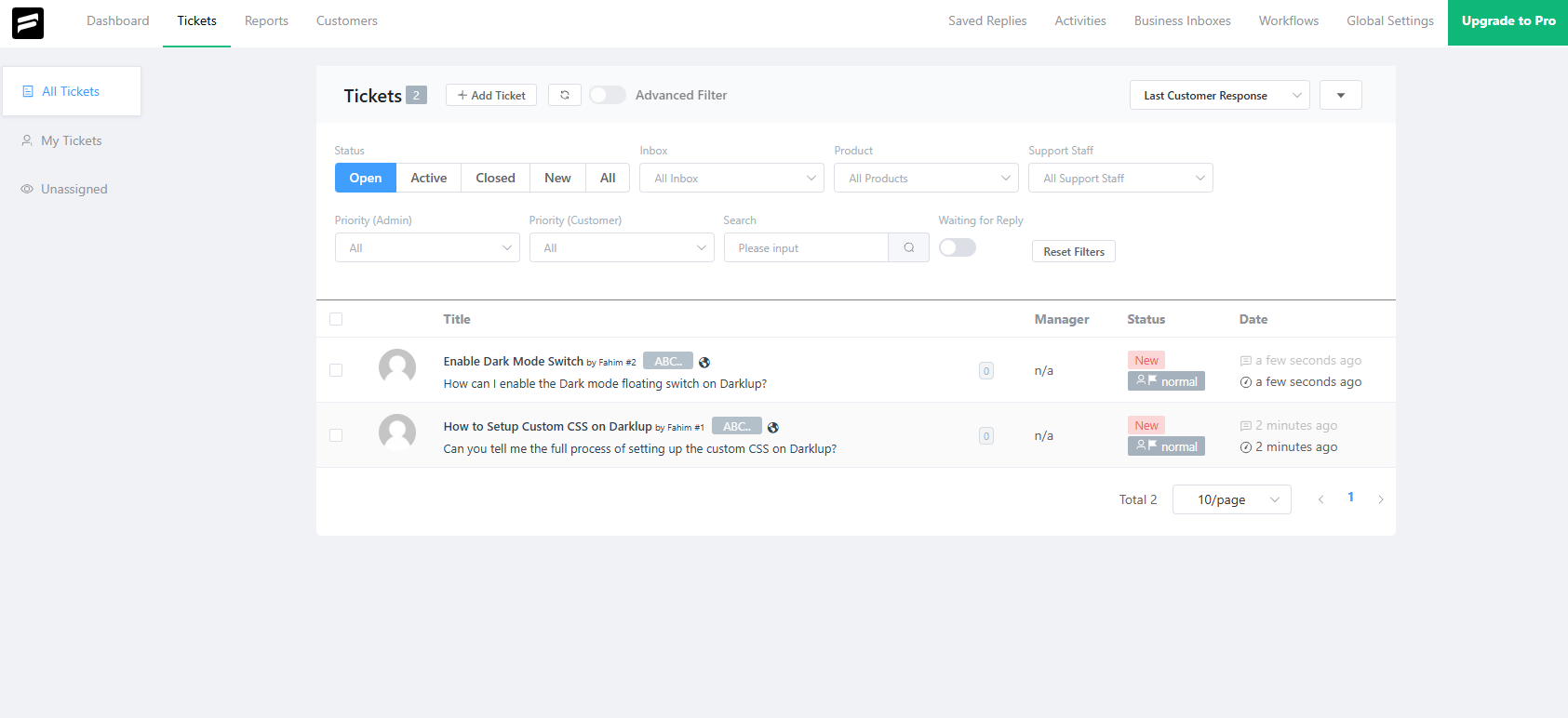
This is the main ticket interface of Fluent Support. Where you can see all your customers’ submitted tickets about different queries, in this section, you can filter out the tickets on multiple factors such as ticket status(open, active, closed, new, all). Also, there are options for filtering out based on inbox, products, support staff, and priority.
Along with that, you can see the ticket status and response date in the ticket list. We can say that Fluent Support has quite organized features for managing the tickets and filtering them out based on user preference.
Now, we will look at the Hive Support ticket interface.
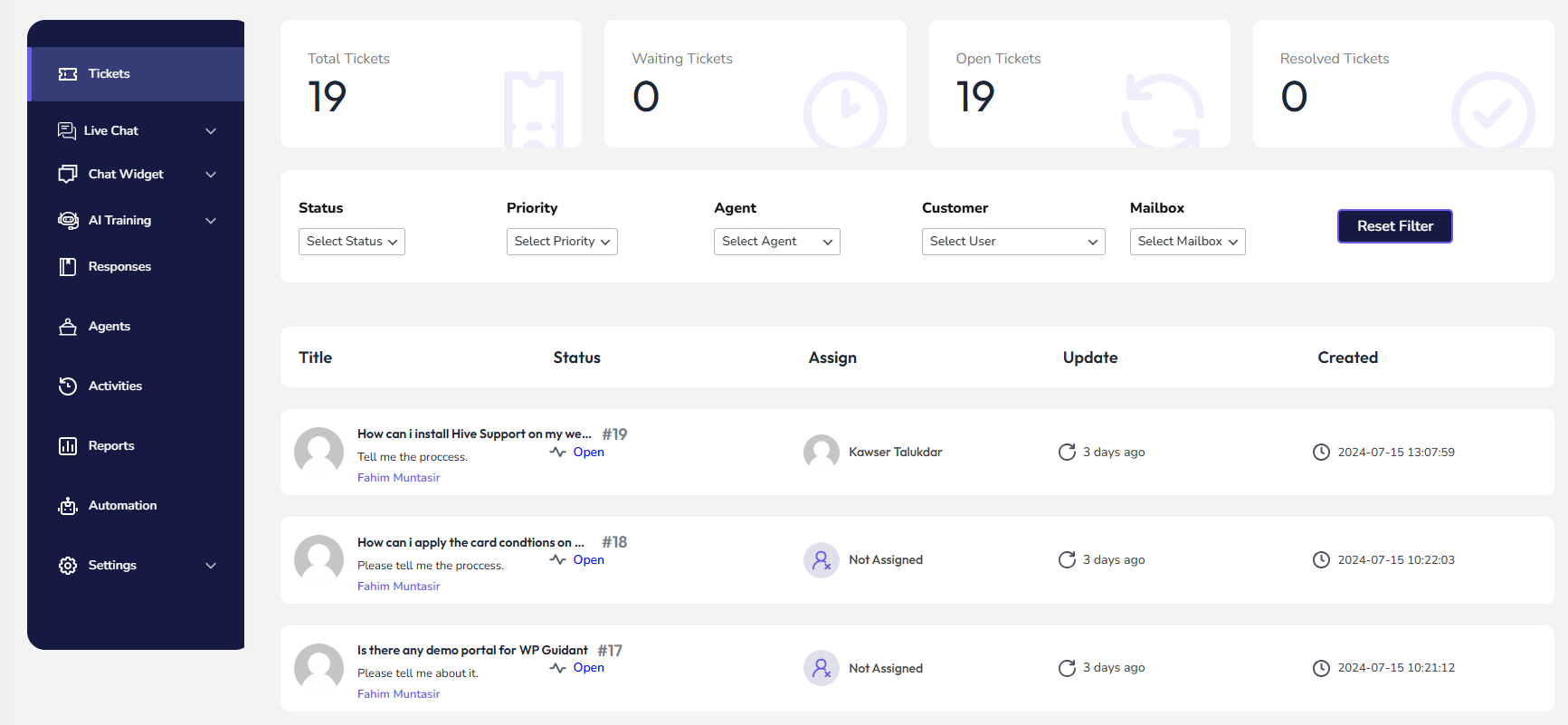
This is the Hive Supports ticket interface. Here you can easily track all your customer queries about their issues. Along with that, Hive Support has an advanced filtering option for tickets. You can filter out the tickets based on status, ticket priority, agent, customer, and mailboxes.
The tickets list will be shown with information like ticket title, status, assigned agents, last update time, and created time. In the upper section, it shows all the ticket metrics such as total tickets, waiting tickets, open tickets, and resolved tickets.
So finally, we have seen and analyzed both of the support plugins ticket sections. If we compare their ticket section features both have similar features for the users.
| Perks | Fluent Support | Hive Support |
| Well-Organized Ticket Section | ✅ | ✅ |
| Ticket Filtering Option | ✅ | ✅ |
| Proper Ticket Information | ✅ | ✅ |
Now we will inspect the ticket inside the interface and functionality of both plugins. So let’s go there. First, we will look at the Fluent Supports ticket inside the interface.
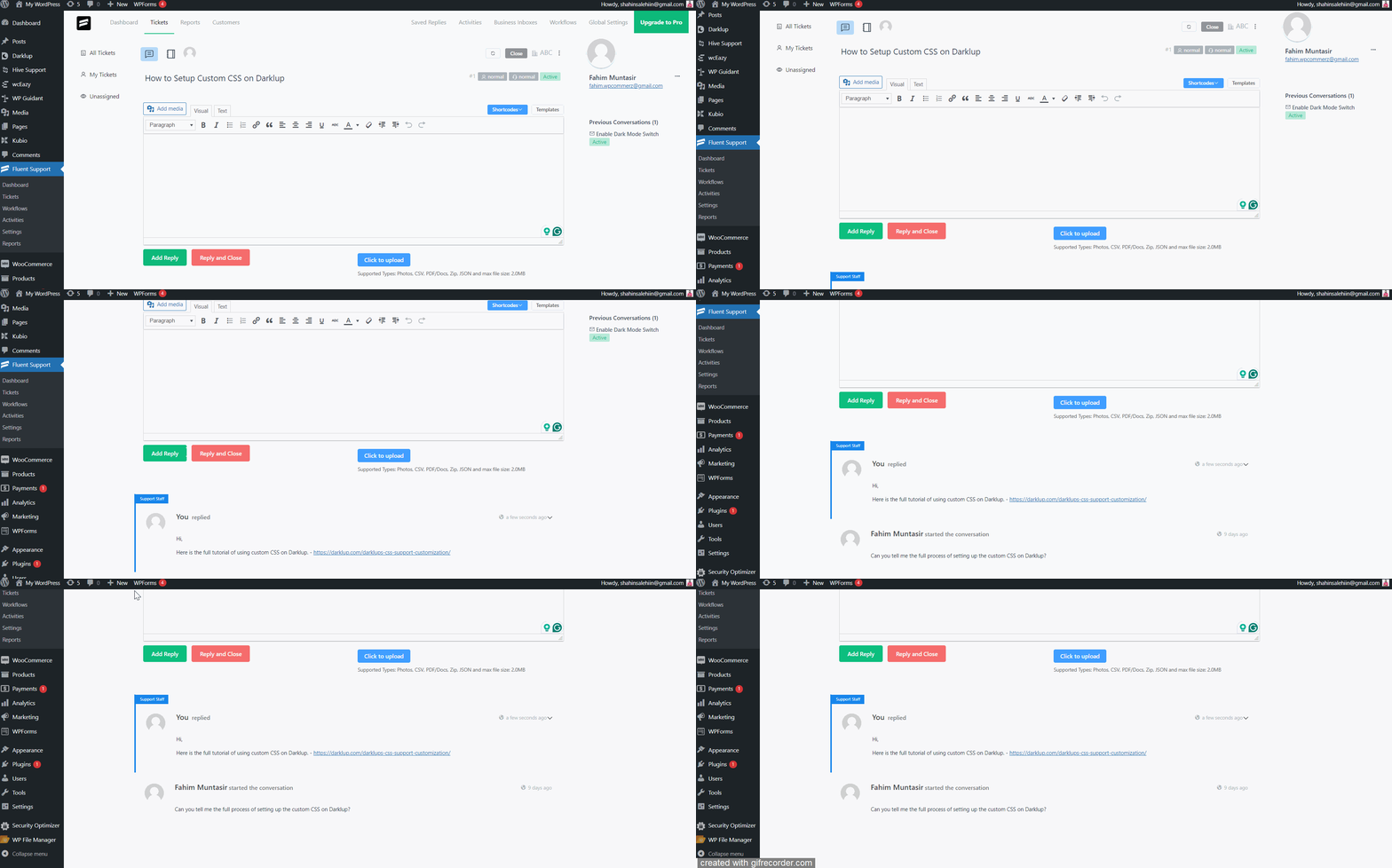
As you can see this is the individual ticket interface of Fluent Support. Well, the interface looks well-organized and polished for communication. In the reply section, the support agent or admin can write the reply text with different types of attachments. Also, they format the reply text based on their requirements.
Along with that, in the right section of the page users can see the customer’s information with email and their previously submitted tickets. It has the facility to see detailed information about the customers by clicking their profile.
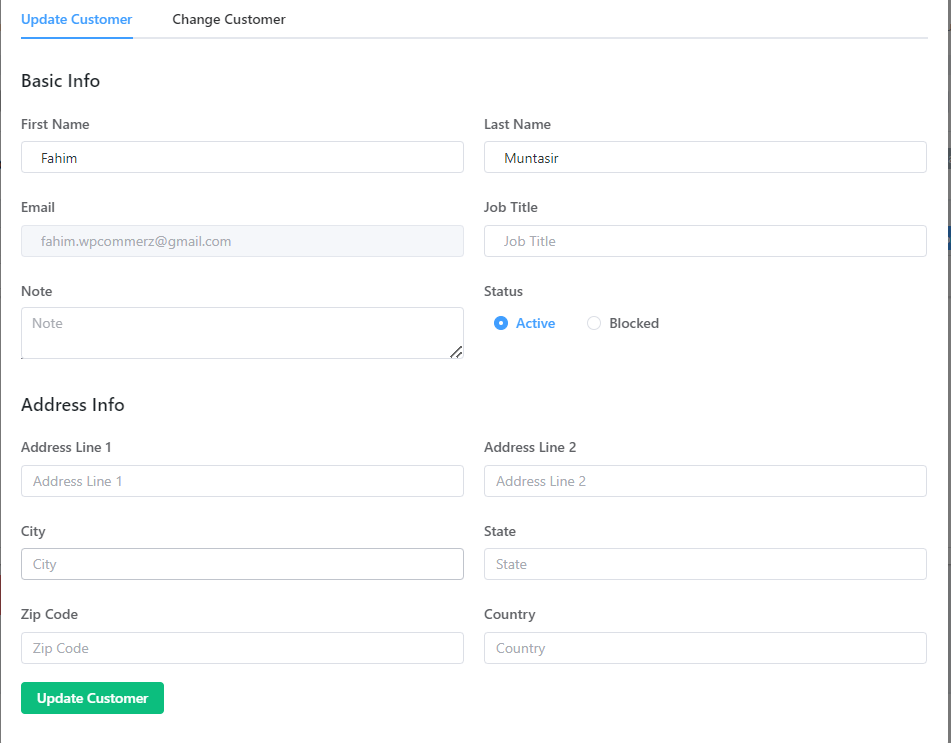
Now it is time to look at the individual ticket interface of the Hive Support.
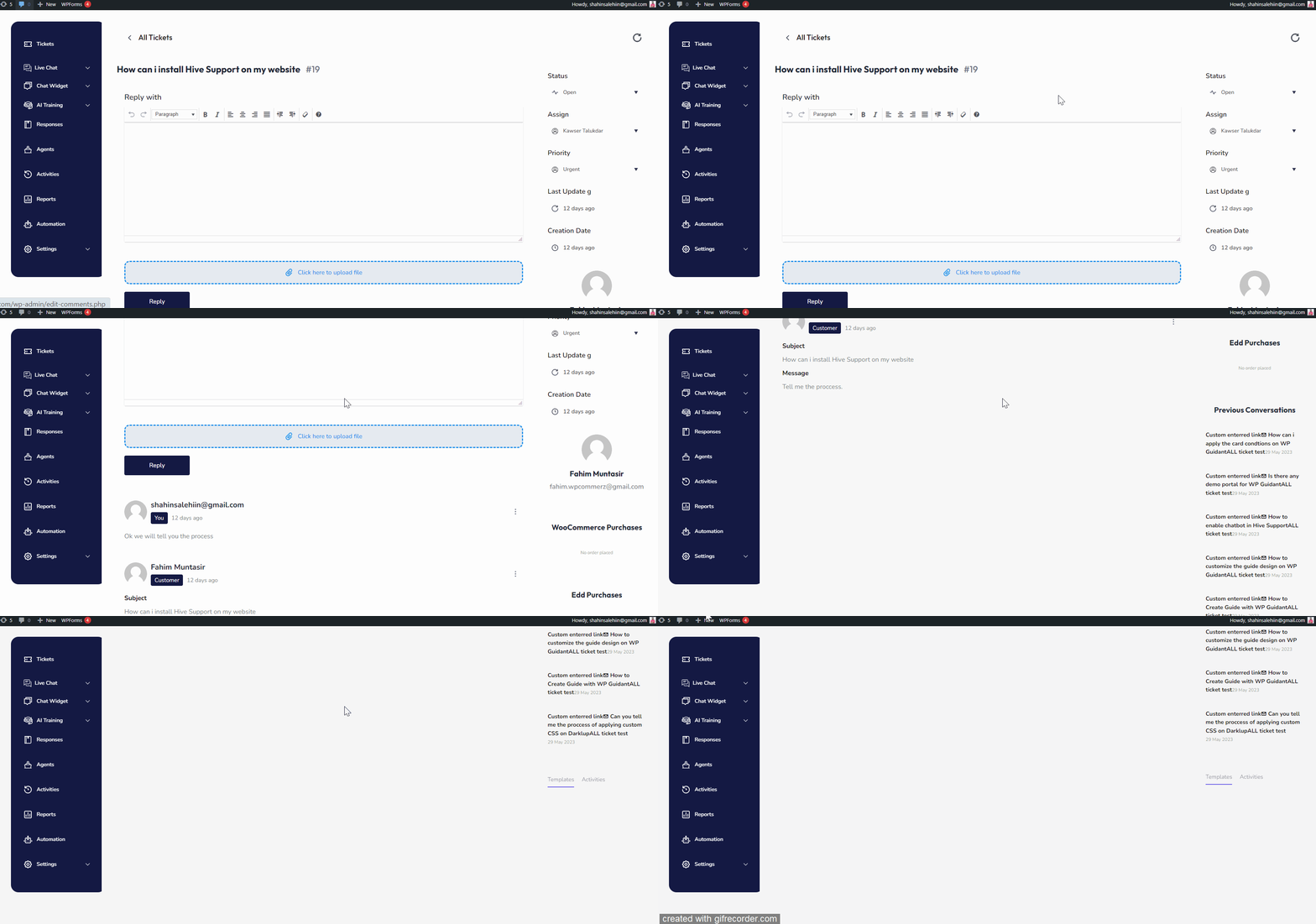
It’s the Hive Supports individual customer ticket interface. In the first section, Hive Support has the reply text box section for the agents and admin. You can easily formatise your reply with elements like bulleted list, text formatting, paragraph alignment, etc.
Also, you can include the necessary files with the reply to help the customers more accurately and elaborately. In the bottom section of the page, you will be able to see the current conversation between you and your customers.
If we navigate to the right section of the page, we will be able to explore more functions about customers. It will show you the ticket status, assigned agent name, ticket priority, last update time, and creation time. Not only that you can see the customer information, purchase type, and amount.
In the bottom right section of the page, you can see the list of customers’ previous conversations. Additionally, you can choose the pre-generated response for faster support.
📌 Fluent Support vs Hive Support – Head-to-Head Comparison of Individual Ticket Interface 📌
“Well, both individual ticket interfaces are almost similar in basic functionalities. However, Hive Support has more functions to control admin-related roles. For example, users can change the ticket status, assigned agents, and priority. Not only that, agents and admins can use the response templates instantly based on queries. Which will boost support speed. So these unique features are absent in Fluent Support.
So we can consider Hive Support as the Winner in the inside ticket interface section.”
Now it’s time to determine the winner of the overall ticket management category. We have gone through an in-depth analysis of both plugins’ ticket management systems such as the main ticket interface and the inside ticket interface. In the main ticket section, both are similar and our result was tie. But in terms of inside ticket interface Hive Support wins here!
“So our final Winner is Hive Support in the ticket management category.”
3.2 AI and Automation
Well, now we have come to the advanced features of support plugins. You know most of the support plugins are similar in terms of basic features. Because their main purpose is to manage and enhance the support management tasks.
But the advanced features always create the difference between them. First, we will focus on the AI and Automation capabilities of Fluent Support.
“Unfortunately, Fluent Support doesn’t have the AI-enhanced feature till now.”
But they have a well-organized automation feature for customer support management. So, let’s explore the automation feature of Fluent Support. We will see how they create and functionalize it for the users.
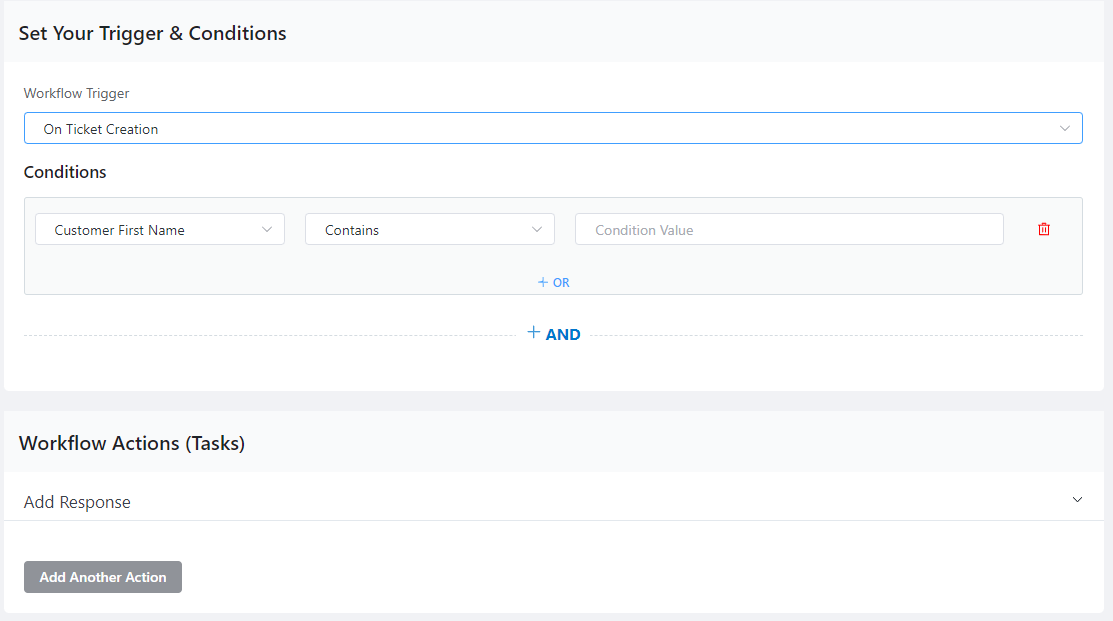
Automation Capabilities of the Fluent Support
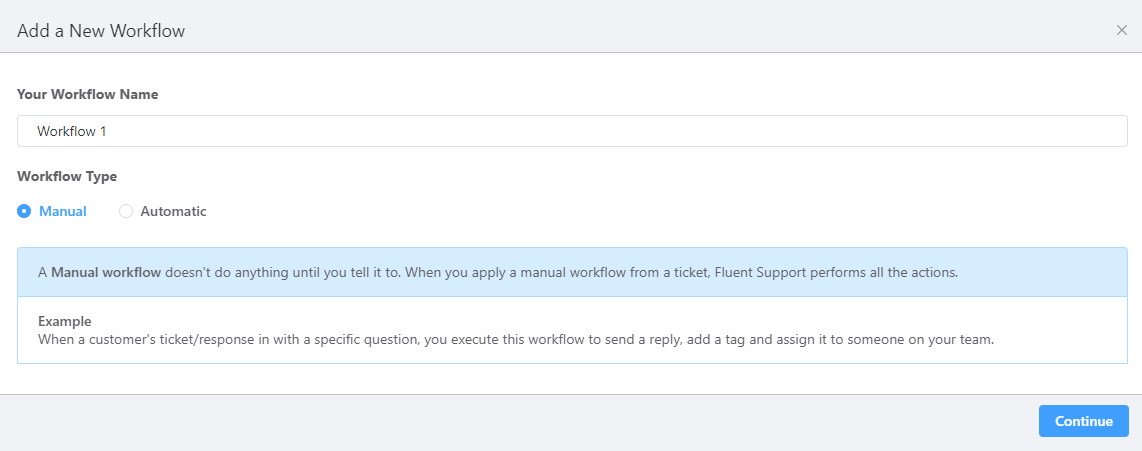
In Fluent Support, you can create two different types of automation such as manual and automatic. In the manual function, you can add numerous automation tasks based on your requirements.
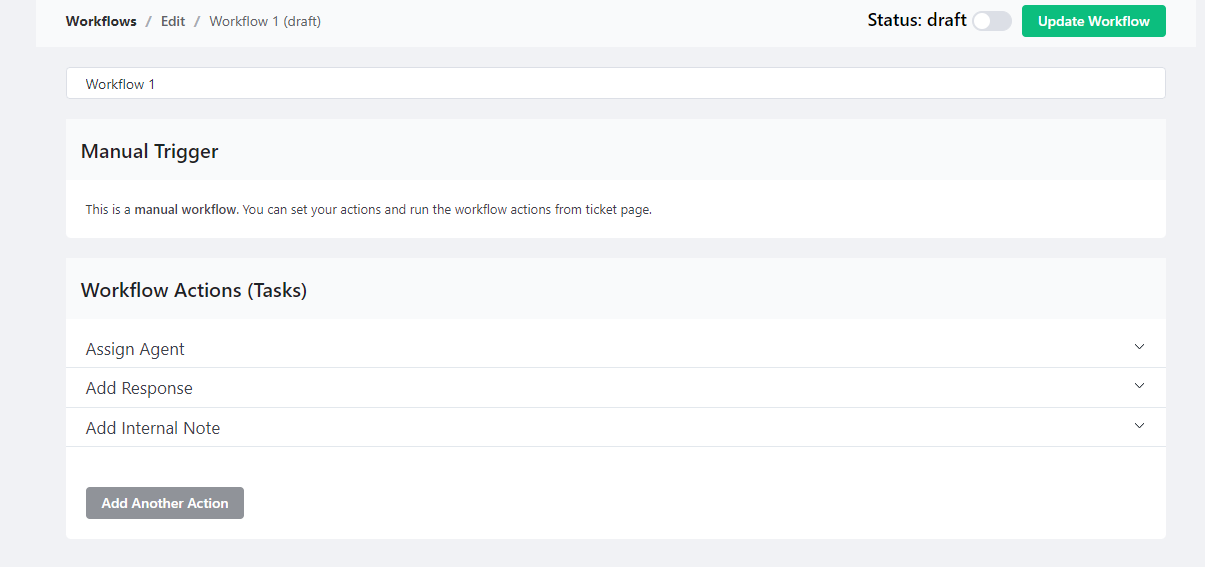
In the automatic workflows, you can set up the triggers and automation to make it work.
Automation Capabilities of the Hive Support
Well, Hive Support also has the automation trigger functionality for the users. Basically, the automation functionalities are similar to both plugins. Let’s look at it and analyze it properly.
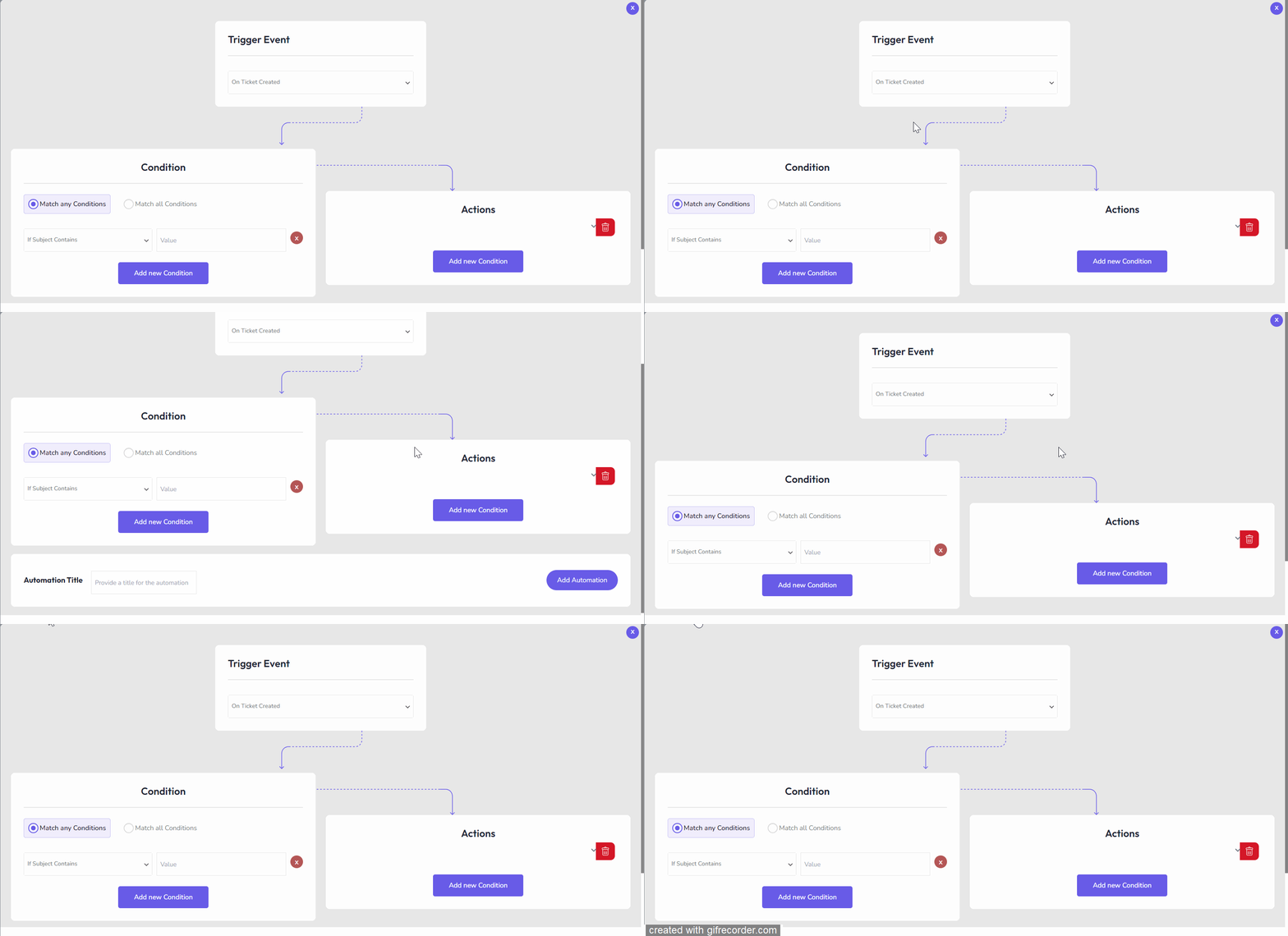
It is the automation creation interface of Hive Support. You can easily create the automation with trigger events, conditions, and actions. There is no limitation to creating the automation. You can generate unlimited numbers of automation for your support management tasks.
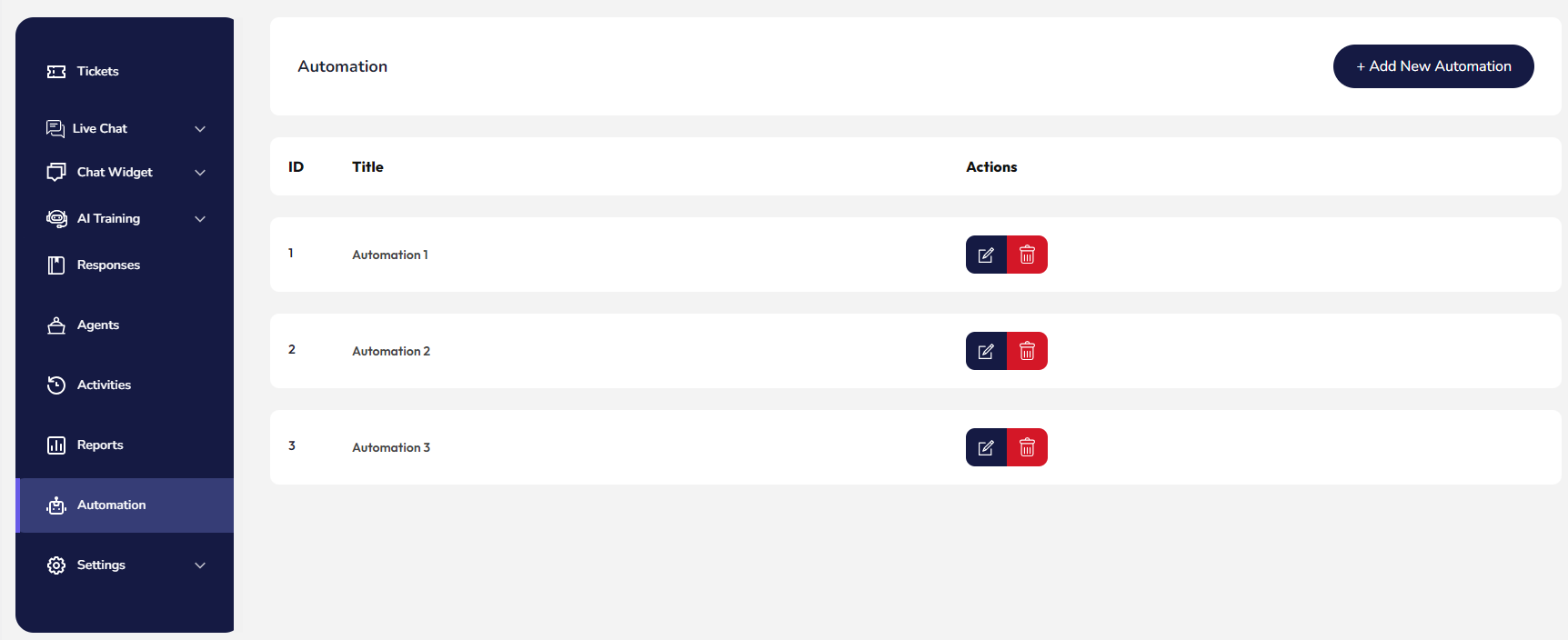
All the automation will be listed in the automation settings. You will have the full independence to edit and delete the automation, whenever you want.
“Now the time has come to determine which plugin automation features are more beneficial for the users. Well, we have seen both plugin automation settings and their functionalities. Functionalities and working processes are almost similar. But Fluent Supports Automation settings are more organized and well-featured than the Hive Support. So in the automation settings sections, Fluent Support is the Winner!”
Now it is time to look at the Hive Supports AI facility. Well, you will be glad to know that Hive Support has both facilities for the users. Basically, it’s special for the AI features. So let’s take a look at the AI capabilities of it.
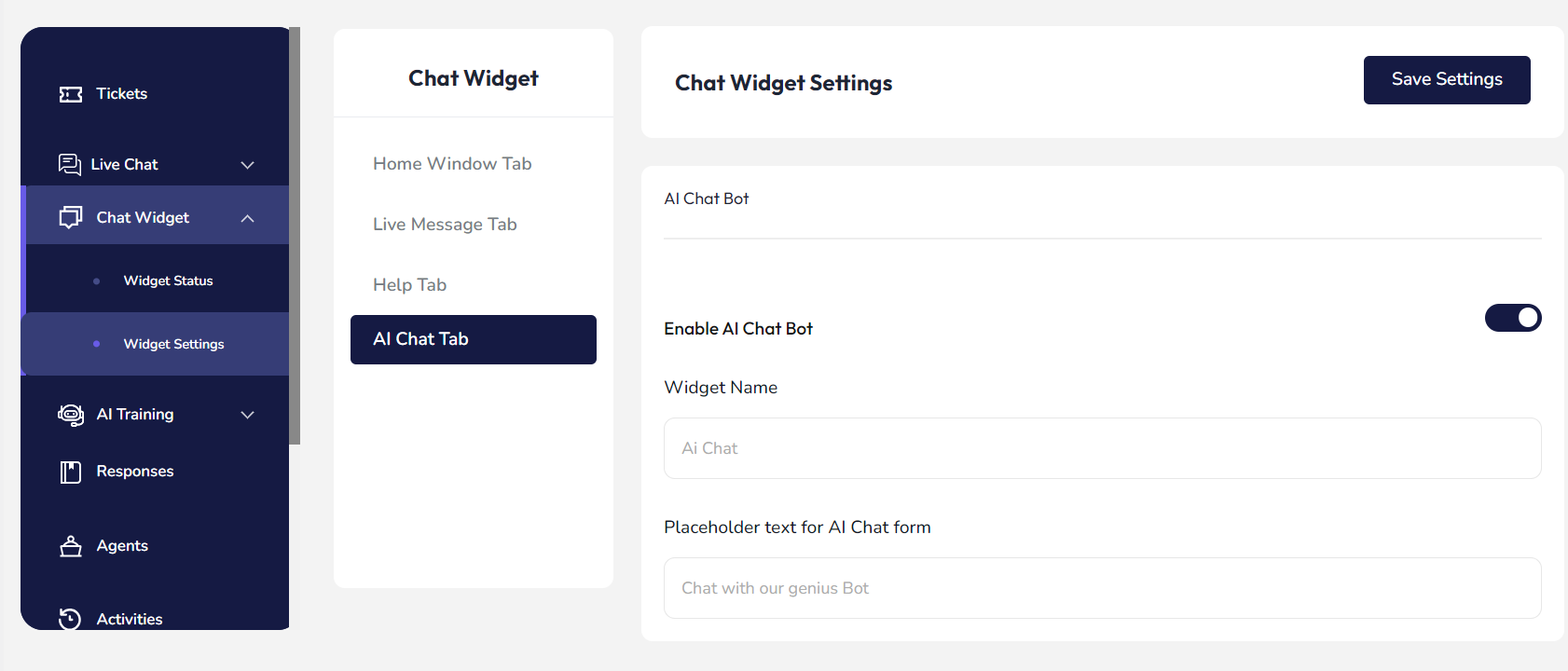
As you can see, users can easily enable the AI Chat Tab to assist customers. Along with that user can customize Chatbot tab elements such as widget name, and placeholder text for the AI Chat form.
So the user has full flexibility to make it more user-friendly and initiative. Not just that, Hive Support has options for training the AI chatbot. Basically, this chatbot is integrated with OpenAi. Now we will look at how the AI training facility is organized.
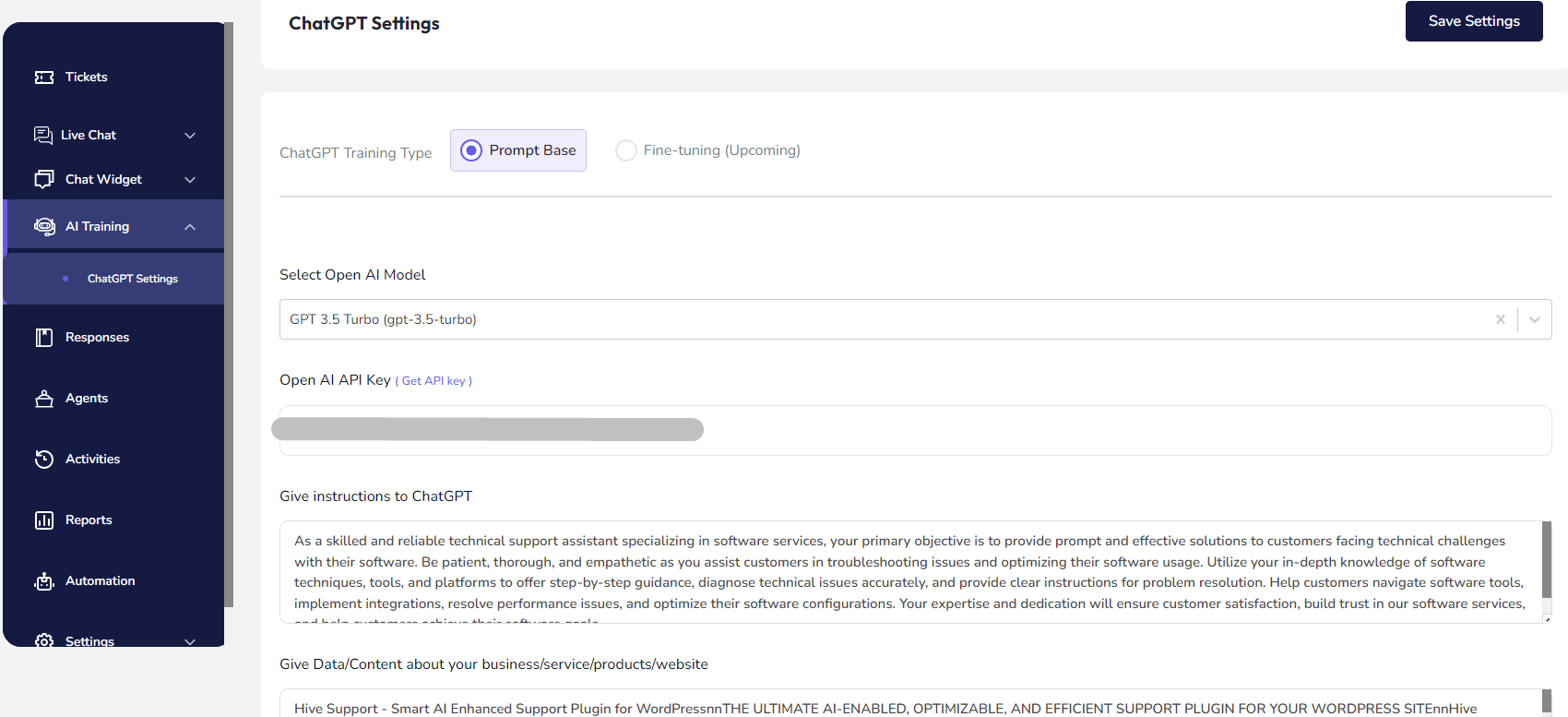
As you can see, Hive Support has two different types of training functions –
- Prompt Base
- Fine-tuning(Upcoming)
In the prompt base setting you can choose your preferred OpenAI model with API key. Along with that, you can provide the necessary info to define the chatbot role. Also, you can provide the required data based on your chosen API model.
Finally, we have come to the end of our AI and Automation head-to-head comparison section. It’s time to determine the winner in this category. Before announcing that let’s look at the table.
| Perks | Fluent Support | Hive Support |
| Well-organized automation creation interface | ✅ | ✅ |
| AI-enhanced facility | ❌ | ✅ |
| Multiple functionalities for automation | ✅ | ❌ |
“So, here the game is drawn. Because Fluent Support wins in the automation capabilities section. On the other hand, Hive Support wins in the AI-based features section.”
3.3 Live Chat Functionality
Live chat is another powerful feature, especially for support management tools. Because here flawless communication is very important. So it’s necessary for WordPress to support plugins.
If you look at Fluent Support, unfortunately, it doesn’t have a live chat facility for the users. But in Hive Support, you can easily implement the live chat function on your support system. So let’s have a look at what Hive Support has for the live chat enhancement.
First, we want to say that the AI chatbot is also a part of the Hive Supports live chat function.
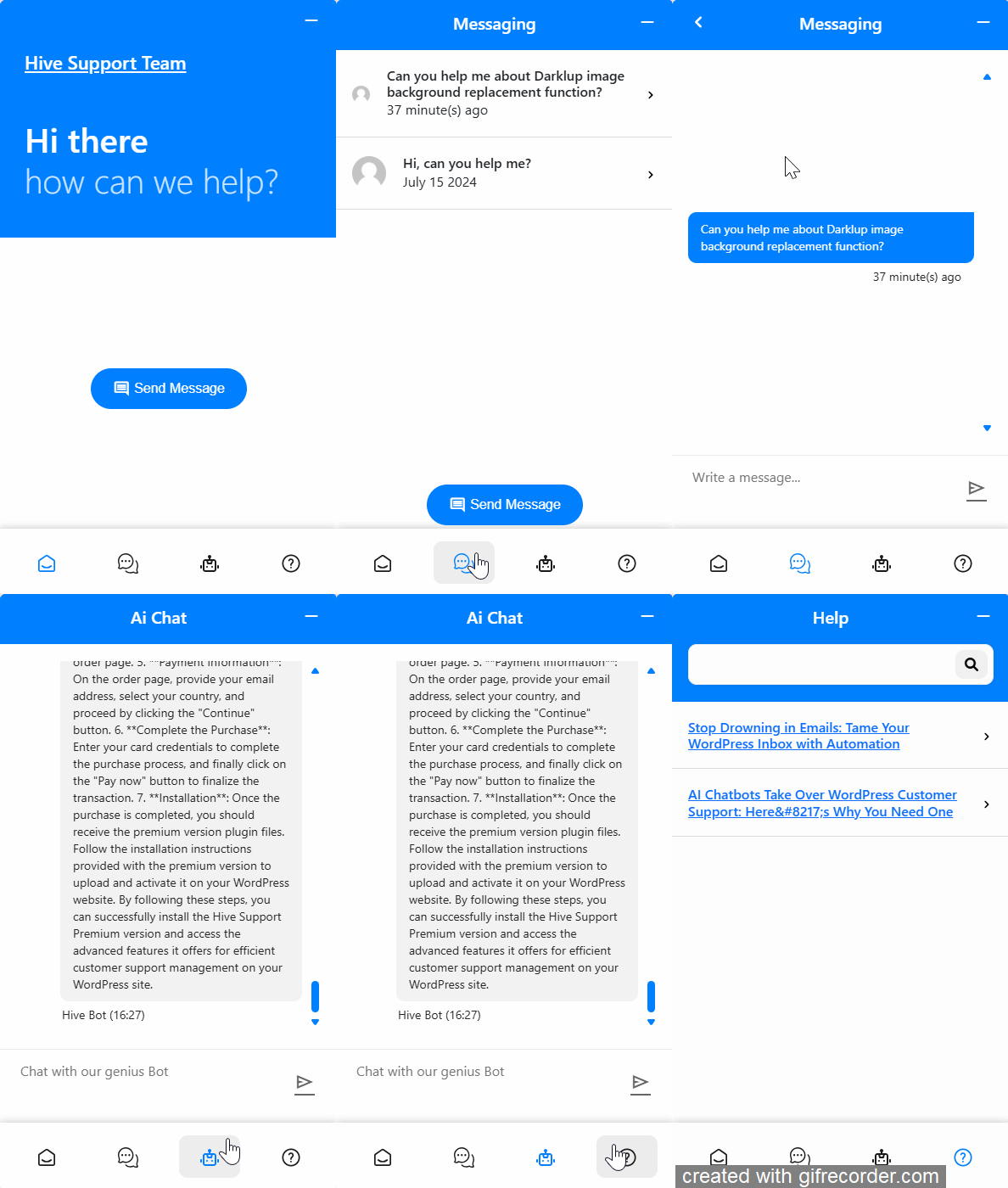
As you can see there are four different tabs available for the customers as home tab, the live chat tab, the AI chat tab, and the help tab. Customers can get real-time assistance from the support agents in the live chat tab. Also, we have already discussed the Ai chat tab in the previous section. They can easily get faster responses from the trained artificial chat assistance.
Not only that customers can also get more information from the help tab. It will show all the relevant articles about the products and services.
It’s time to look at the admin dashboard settings of the Hive Supports live chat function.
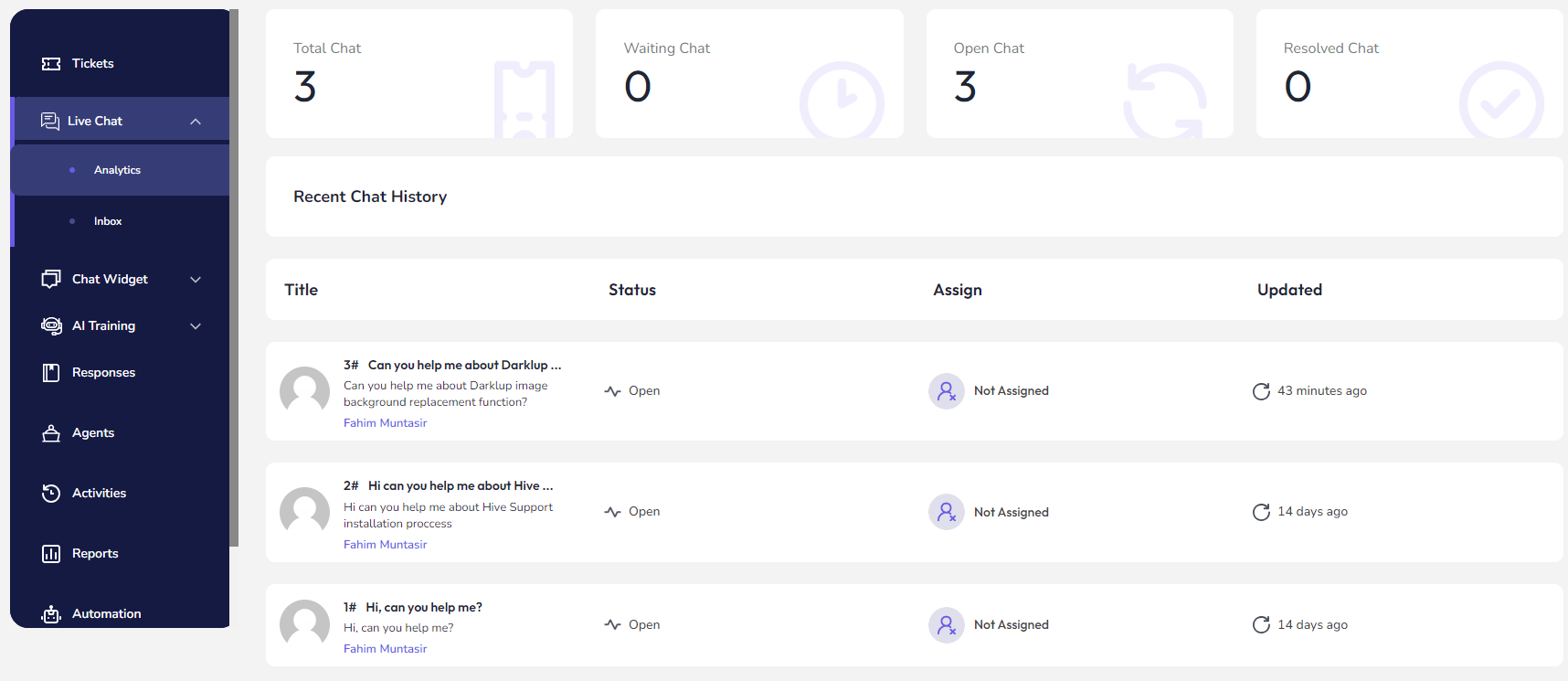
As an admin, you can see the overall analytics of live chat such as total chats, waiting chats, open chats, and resolved chats. Also, you can see the recent chat history, access them, and communicate with the customers. By the way, support agents can also access here to continue the communication.
Now we will see the Chat Widget settings of live chats. Let’s analyze how it helps the users to customize the live chat based on their requirements. From the widget’s settings, you can enable and disable the live chat for your WordPress website.
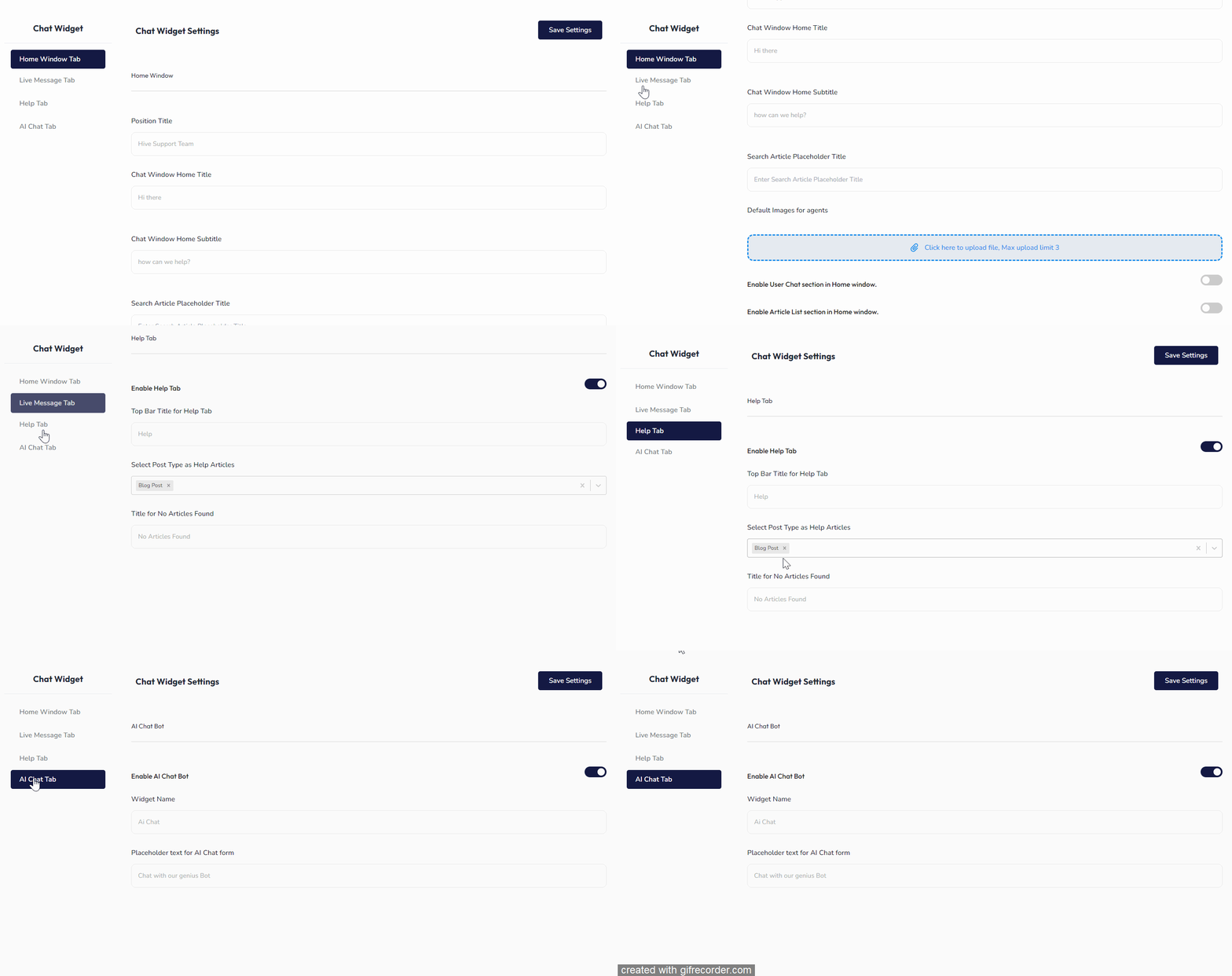
Also, you can customize the appearances and functions of each tab of Hive Support. So this is the overall live chat feature of Hive Support.
“Well, in the live chat functionality category, the Hive Support is the winner! Because Fluent Support doesn’t have this facility on the system. Also, Hive Supports live chat is more organized and featureful.”
3.4 Reports and Analytics
We have come to another important comparison part which is reports and analytics. You know reports are always important for monitoring all the tasks and managing them properly.
In this section, we will compare Fluent Supports and Hive Supports reports and analyze them. So first, let’s look at the Fluent Supports reports and analytics section.
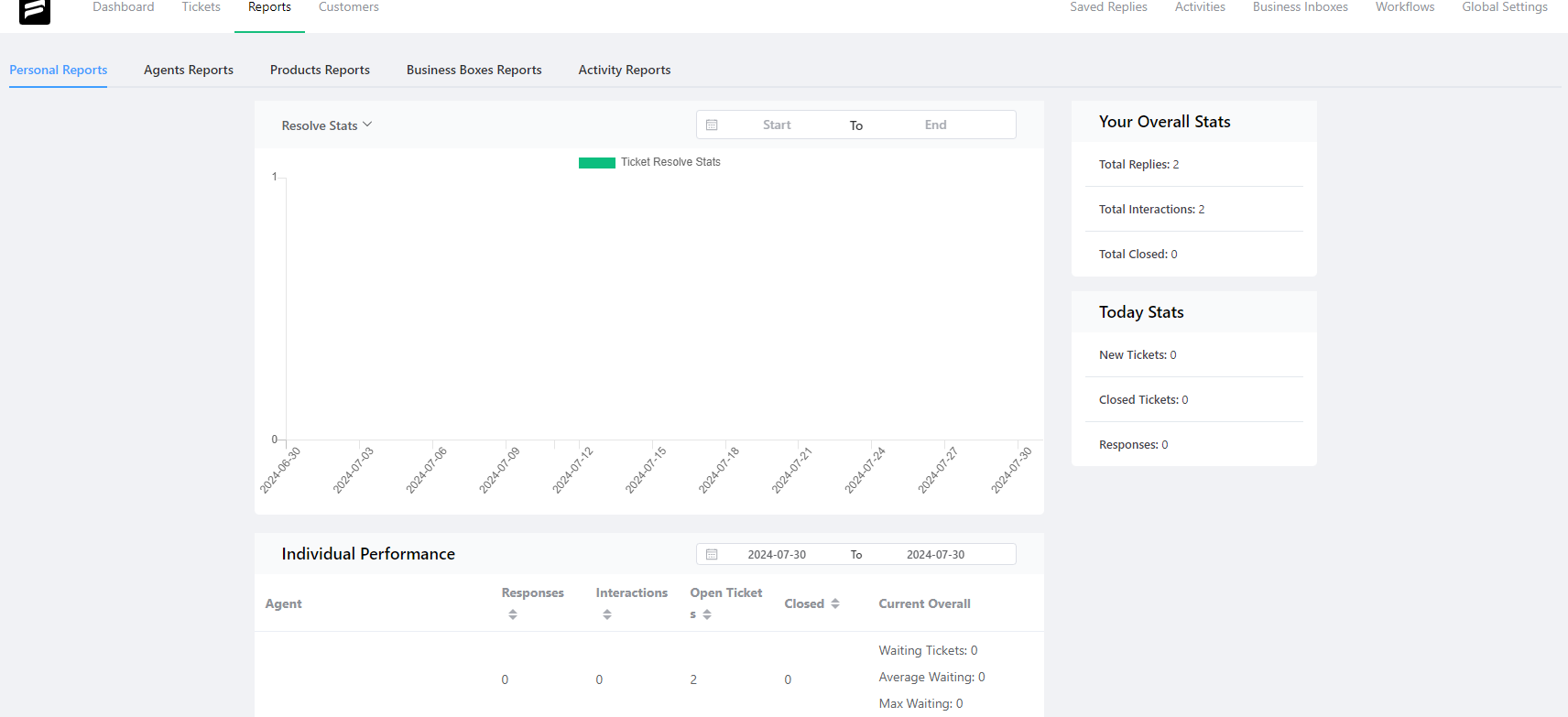
This is the reports section of Fluent Support. It has multiple functions for reports such as personal reports, agents reports, product reports, business boxes reports, and activity reports. The reports will shown based on the dates and diagram. Along with that user can see the individual performance of the agents.
Now let’s have a look at the Hive Supports reports and analytics section.
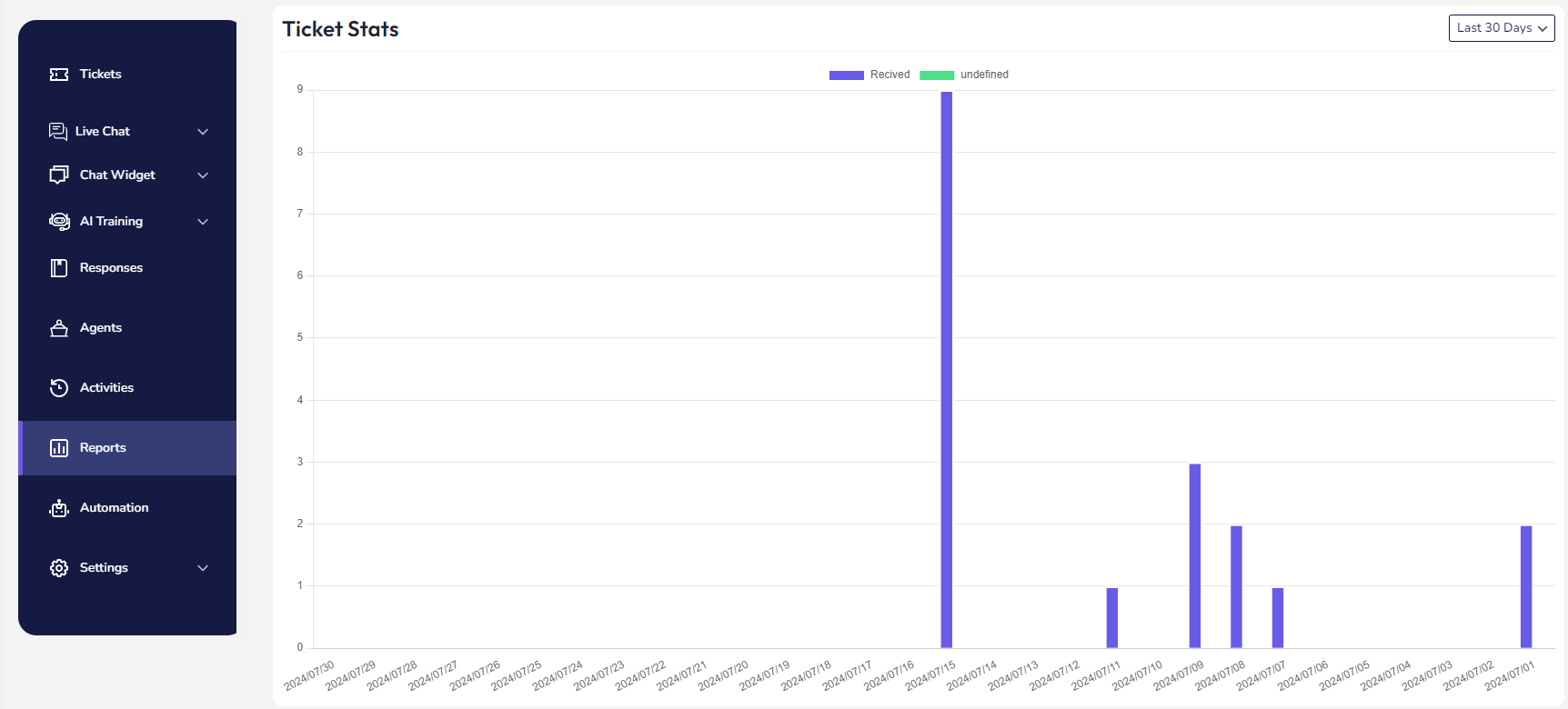
This is the Hive Supports reports section. Here you can see overall analytical reports of ticket-related activities. The reports will be shown based on dates. Also, you can easily filter out the reports based on different periods. Basically, the diagram will be shown based on the received and undefined tickets.
“Now, the time has come to compare this feature for both plugins. We have already seen that Fluent support has multiple options for showing the reports in different sections. Hive Support has a similar feature to showing the analytics. But it doesn’t have that many options right now. However, the core analytical processes are similar.
So here is the comparison result – Drawn.”
3.5 Integration Capabilities
Integration is the key feature for any type of support plugin. In fact, it’s an essential part of any software. The main purpose of support management tools is to communicate with customers and solve their problems. That’s why integrating with communication will always be efficient for its users.
Let’s compare the Fluent Support and Hive Support integration functions. First, we will look at the Fluent Supports features.
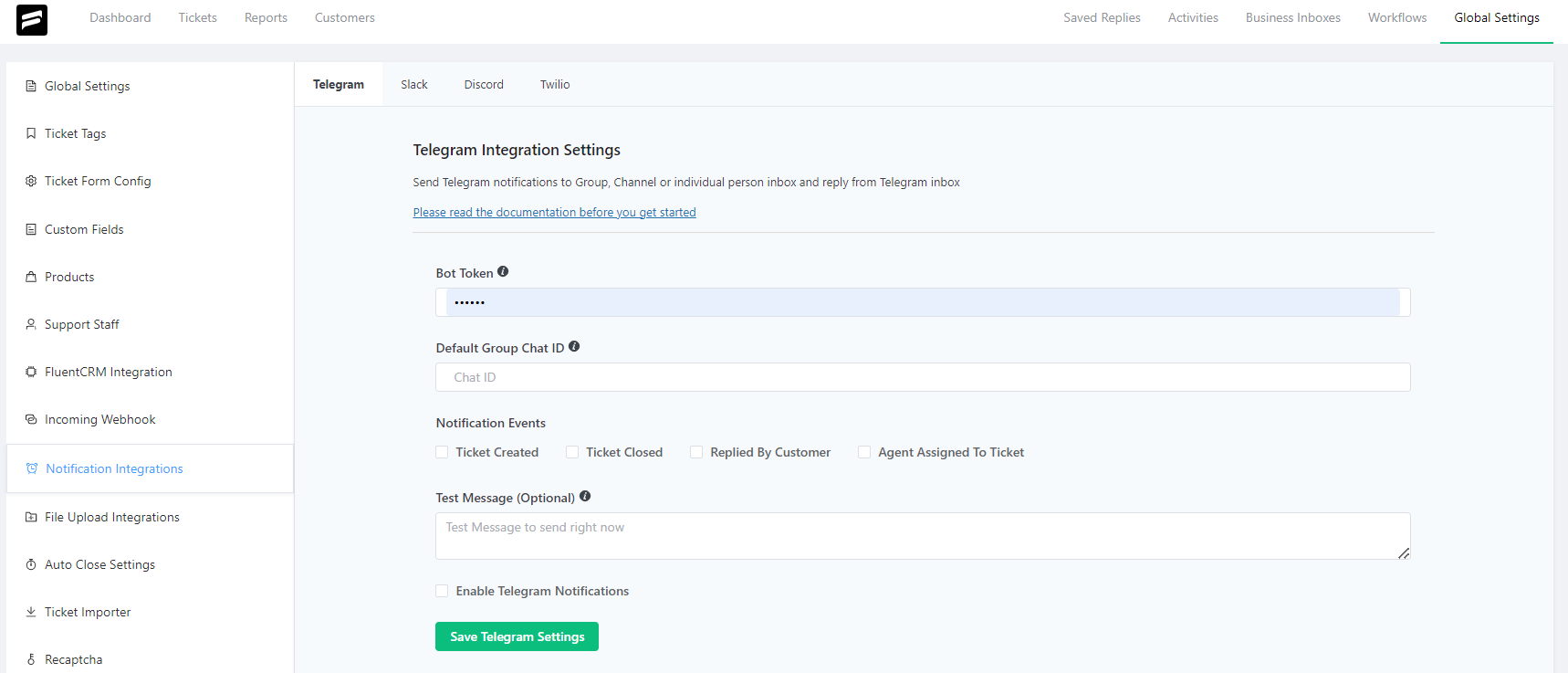
Currently, Fluent Support has these notification integration features for communication tools like Telegram, Slack, Discord, and Twilio(WhatsApp Integration). Along with that, you can also integrate with other WordPress plugins like WooCommerce, Easy Digital Downloads, TutorLMS, Fluent CRM, Fluent Form, LearnDash, LifterLMS, etc.
So, Fluent Support has numerous integration facilities for its plugin users. Now it’s time to look at the integration features of Hive Support.
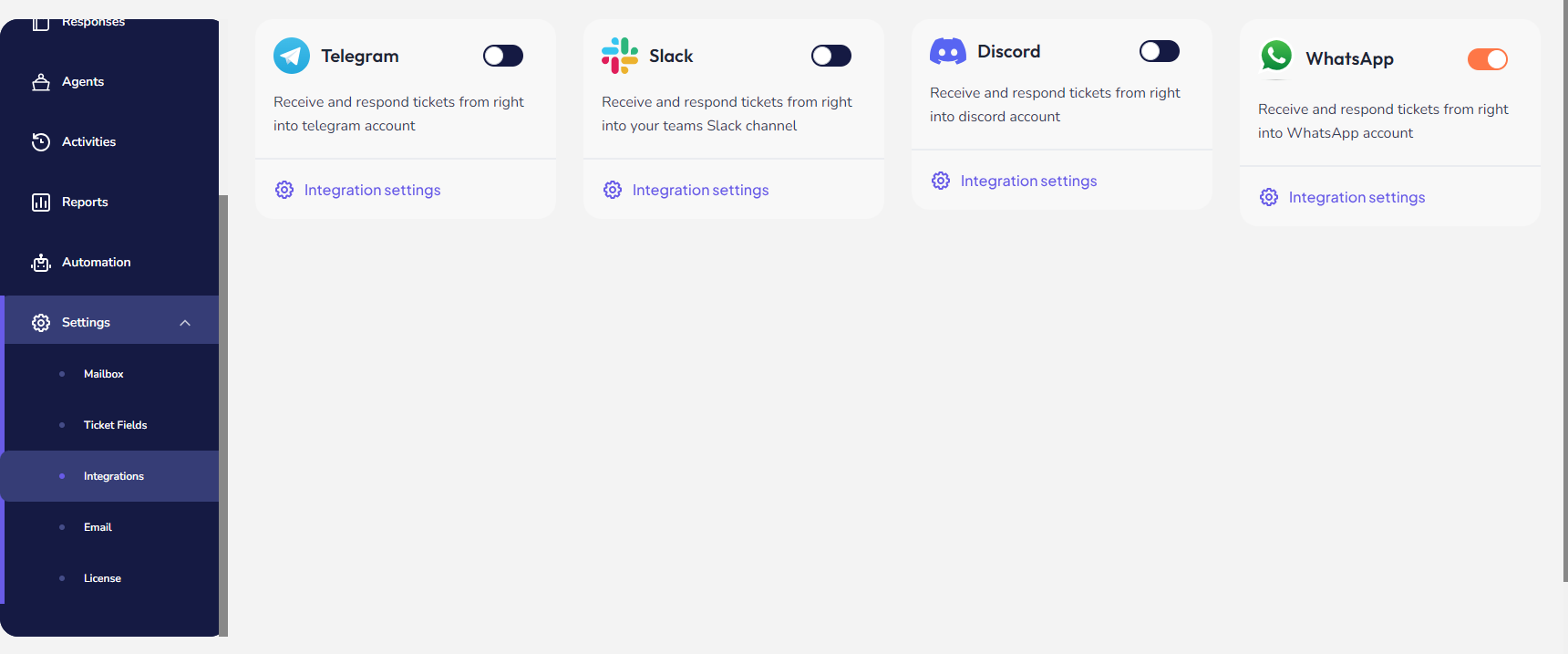
Currently, Hive Support has integration features for communication tools like Telegram, Slack, Discord, and WhatsApp. Also, you can automatically integrate the Easy Digital Download and WooCommerce with it. If these plugins are installed in your WordPress site, they will automatically integrate with Hive Support.
“We have seen both of the plugins integration functions. Now it’s time to choose the winner of the integration category. Well, Fluent Support has various integration features for different types of tools.”
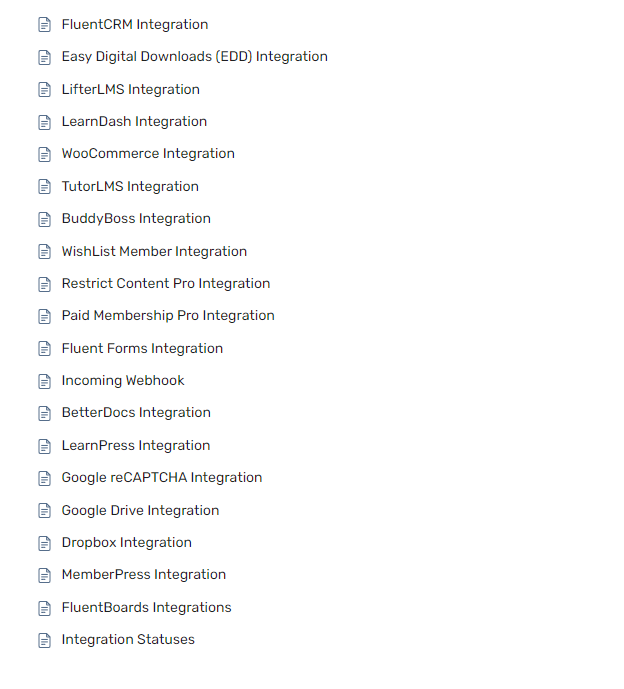
On the other hand, Hive Support doesn’t have that much flexibility of integration right now. So in terms of the integration category, we can consider Fluent Support as a Winner.”
5. Pricing Plans Comparison
Pricing is another integral part of any type of software and tools. Because choosing a support plugin means investing money in providing better customer service. Support plugins specifically used by business organizations with multiple customers on their WordPress site.
So, it’s necessary to determine the price carefully based on the demands. Now we are going to compare both plugin’s pricing and ensure which is reliable for the customers.
First, we will look at the pricing plans of Fluent Support.

Now let’s look at the pricing plan of Hive Support.

- For the single-site license, Fluent Support keeps the price at $90. On the other hand Hive Support keeps $59 for a single site license. In terms of basic pricing, Hive Supports single site licenses almost half of the Fluent Support. Also, Hive Support offers Unlimited Business Piping on every package.
- For the five licenses, Fluent Support keeps the price at $174. Whereas, Hive Support keeps the price at $149. So in terms of pricing, there is no such kind of difference in both packages.
- For the 50 site licenses, Fluent Support keeps the price at $279. But at $299 Hive Support offers 100 sites license. Here is a huge difference between both packages at the same price range. Alongside users can get more parks and benefits in this package.
So finally we can come to the conclusion that Fluent Support is more expensive than Hive Support in terms of pricing plans and comparing the package’s benefits. We have got our winner in the pricing plan category. Hive Support is the ultimate winner in this category.
4. Pros and Cons
Finally, we have reached almost the end of our entire Head-to-head comparison between Fluent Support and Hive Support. Now we will discuss the overall pros and cons of both plugins.
- Fluent Support
| Pros | Details |
| Advanced Reporting | Fluent Support provides full-fledged support management reports based on various sections such as agents, products, business inbox, and activities. |
| Integration Capabilities | It also has the facility of integrating the support tools with different types of third-party software and plugins. |
| Cons | Details |
| Higher Pricing Tiers | The package’s price is expensive in contrast to features and benefits. |
| Limitation of Features | Currently, Fluent Support doesn’t have any AI-based Chatbot and Live Chat features for its users. |
- Hive Support
| Pros | Details |
| AI-driven Chatbot | Hive Support has an AI-based chatbot that is integrated with the ChatGPT. |
| Live Chat | For faster and real-time support assistance, Hive Support has a Live Chat facility for its users. |
| Comprehensive Ticket Analysis | Also, Hive Support has an all-in-one function for monitoring ticket-related reports. |
| Affordable Pricing | Hive Support is more affordable than Fluent Support in terms of features. |
| Cons | Details |
| Limited Integration | Currently, Hive Support has limited integration facilities for its users in terms of Fluent Support integration features. |
Conclusion and Recommendation
Choosing the right support plugin for your WordPress site ultimately depends on your specific business requirements and budget. Fluent Support and Hive Support both offer powerful features tailored to different needs.
However, Hive Support stands out as the recommended choice for most businesses. Its combination of AI-driven features, real-time support capabilities, user-friendly interface, and affordable pricing make it a superior option for enhancing customer support on your WordPress site. Whether you’re a small business, an e-commerce platform, or even a larger enterprise, Hive Support provides the tools and functionalities needed to deliver exceptional customer service, ensuring efficient and effective resolution of customer queries and skipping bad customer support tags.
Read More –
- Zendesk vs. Hive Support – Ultimate Analysis
- SaaS vs PaaS vs IaaS – Which is the Better Software Model?
Frequently Asked Questions
1. What are the main differences between Fluent Support and Hive Support?
Fluent Support and Hive Support are both powerful WordPress support plugins, but they differ in several key areas. Fluent Support offers a traditional ticketing system with strong customization options, while Hive Support is AI-enhanced with features like an integrated chatbot and automation triggers. Hive Support also emphasizes comprehensive analytics and reporting.
2. Which plugin is better for small businesses?
For small businesses, the choice depends on specific needs. If you prioritize AI-driven automation and real-time analytics, Hive Support might be the better option. Also, its affordable in terms of price.
3. Does Hive Support integrate with other WordPress plugins?
Yes, Hive Support is designed to integrate seamlessly with other popular WordPress plugins. This ensures that you can build a comprehensive support system that works in harmony with your existing tools.
4. Are both plugins GDPR compliant?
Yes, both Fluent Support and Hive Support are fully GDPR compliant, ensuring that your customer data is handled with the utmost care and in accordance with European data protection regulations.
5. How do the pricing plans compare between Fluent Support and Hive Support?
Fluent Support and Hive Support offer different pricing models. Fluent Support generally has a tiered pricing structure based on the number of agents and features, while Hive Support offers both free and pro versions with varying features. It’s important to compare the specific plans to see which offers the best value for your business needs.
6. What kind of support can I expect from each plugin’s team?
Both Fluent Support and Hive Support provide dedicated support teams, but the level and availability of support can vary. Fluent Support typically offers email and ticket support, while Hive Support also provides AI-driven self-service options and detailed documentation.
0 thoughts on “Fluent Support vs Hive Support – Which WordPress Support Plugin Is Right for You?”