How to Automate Customer Service for All Business Types!

Are your customer inquiries piling up faster than your team can handle? Streams of questions, requests, and follow-ups will always distract from real business growth.
But, what if you didn’t have to answer the same question a hundred times? What if some of that burden could… vanish?
The solution is to automate your business.
Today, automation tackles the small, repetitive hurdles, so your team has the bandwidth for bigger tasks. Remember, it’s not just about managing; it’s about doing it better than your competitors.
So, what is automated customer service? Where does automation begin, and how far can it take you? Let’s check it out right here.
Table of Contents
What’s Behind Customer Service Automation
At its core, customer service automation is like a network of interconnected gears. AI, machine learning, NLP, etc. all work together to create a streamlined support experience.
Here’s what you will find behind automation in customer service:
- Machine learning and AI: Processing vast amounts of data, learning from it, and adjusting for improvement.
- NLP: Breaking down natural human language, so machines can respond as a human would.
- Integration: Merging old systems with the new ones, ensuring they work as one cohesive unit.
- Data-driven insights: Relying on data to guide automation and refine decision-making processes.
- Automated ticket routing: Getting customer inquiries to the right agent, based on skill and priority.
- Omnichannel Handling: Automation handling inquiries across various platforms, and ensuring consistency and accessibility.
- Ongoing fine-tuning: Constant updates and adjustments to keep the system fresh and relevant.
Note: Remember, customer service automation means the dedicated balance of technology, integration, and human intuition. Without careful management, even the most advanced system can break down.
If you are on WordPress, Hive Support hands you a toolbox—AI chatbots, ticket systems, and highly useful integrations all wrapped up together. It ensures your systems provide meaningful responses, even on team holidays.
Ready For A Faster, Smarter Automated Service?
Why Opt for Automating Customer Service: Key Benefits
Customers seek answers fast—without hurdles or waiting. Let’s say, an AI bot jumps in at odd hours and sorting issues before anyone even asks. That’s how things click today.
Here are some key benefits of automating customer services:
Support That Never Sleeps
Quick responses, day or night, keep customers happy. Customer Service automation tools handle these with zero fuss, and the best part is that questions are met with instant answers, no matter the time zone.
Teams Do More By Working Less
Why should repetitions be done by your team, right? Task an AI to tackle tickets, suggest solutions, or gather details. Free your team to solve problems that demand skill and care.
Lower Costs, Higher Gains
Routine tasks need no human hands. Automation reduces expenses while making room for business improvements that count.
Improved Customer Insights That Talk
With automation, you can scrape data that reveals your customer’s intent. Patterns in queries, preferences, and feedback surface naturally. So, your choices become much smarter.
Scales Effortlessly For All Growing Businesses
Remember, growth doesn’t need to be a pain in the neck. The right automation will adjust and grow with you, managing increased volume, languages, or platforms without skipping a beat.
Boosts Loyalty Without Trying
Streamlined, fast support keeps customers or clients coming back. Plus, they tell others that your product is good.
Automation is not about doing more; it’s just about doing it right, all while keeping things surprisingly simple.
Hive Support transforms how teams work, automating 70% of routine tasks, and reducing resolution time by 30%. Efficiency jumps by 40% with smarter workflows, while 20% more satisfied customers speak volumes.
How to Automate Customer Service: Step By Step
Automating customer service isn’t just a trend anymore, but a necessity. AI, machine learning, and advanced analytics empower businesses to offer faster, more personalized customer service.
Here’s a quick, step-by-step guide to automating support, with insights and proven strategies.
1. Identify Your Needs (A Data-Driven Approach)
You need to start by understanding your situation. Data-driven decisions are key here. Dive deep into your service channels and uncover patterns, weak spots, or unnecessary complexities. What part of your service needs streamlining?
How to figure it out:
- Examine workflow patterns: Evaluate how tickets are handled. Is your team spending time on tasks that could be automated?
- Customer feedback: Listen to this very closely. If customers are frustrated, there’s likely room for improvement.
- Track volume-heavy tasks: Identify the repetitive, high-volume issues that can be done on automated solutions. Example: Password resets, troubleshooting FAQs, etc.
2. Determine Which Tasks Can Be Automated Effectively
Not every task should go to the robots. Stick to tasks that are predictable and easy to handle without any human intervention. Some things will always need the personal touch, but there’s plenty that can be automated with ease.
Tasks perfect for automation:
- Ticket Routing
- Password Resets
- Customer Account Verification
- Basic Troubleshooting
- Frequently Asked Questions (FAQs)
- Order Tracking
- Appointment Scheduling
- Feedback Collection
- Proactive Notifications
- Knowledge Base Suggestions
3. Select the Right Automation Tools and Platforms
Not all tools are created equal. The platform you choose will always shape the automation experience. So, pick one that grows with you, aligns with your existing system, and scales to meet increasing demand.
If you are unsure about what you require, go for Hive Support. With AI chatbots, flexible automation, and seamless links to Slack, WhatsApp, and more, it adapts to most of your needs.
4. Identify Tasks That Should NOT Be Automated
Some situations demand empathy or creative thinking. For those needs, a human on the other end is a must. Be honest about where automation will add value, and where it might fall short.
Keep these things human:
- Complex cases: If the issue requires multiple steps or creativity, leave it for a human.
- Sensitive situations: When things get personal, like complaints or emotional conversations. Let your team step in.
- Customized service: Onboarding clients or account customization, should stay in your hands.
5. Ensure Team Alignment and Training
Your team needs to align with the automation and understand how it works and how it fits into the current workflow. But most importantly, your team should know what to do when it doesn’t work.
6. Test Your Automation Systems Thoroughly
No matter how great the plan, testing ensures you’ve thought of everything. You need to pilot, refine, and retest. The final rollout should be smooth and well-informed.
What to test (The Basics)
- Test runs: Limit early access to specific scenarios. This helps minimize risk while still gathering real-world data.
- Simulate peak times: Run stress tests to see how your system performs under pressure.
- Customer feedback: After a test run, always ask customers about their experience. Their input can help fine-tune your automated features.
7. Monitor and Optimize Automation Systems
Once live, you need a focused eye on your automation. Regular checks, performance metrics, and updates are crucial for long-term success. If it isn’t evolving, it’s stagnating.
Key metrics to watch:
- Response Time: Faster responses mean the customer requires you, and you have a chance to make them happy.
- Customer Satisfaction (CSAT): Customer feedback through ratings indicates the quality of service.
- Resolution Rates: The percentage of issues resolved without escalation or follow-up.
- System Uptime and Reliability: Measure how consistently the system performs without interruptions.
- Machine Learning Performance: Track how well AI systems are adapting and improving over time.
- A/B Testing Results: Compares the effectiveness of different automation strategies.
- Customer Engagement Metrics: This is how actively customers are interacting with your automated support tools.
- Self-Service Success Rates: The percentage of customers who resolve issues using self-service options.
- Escalation Rates: This rate is how often issues are handed off to human agents from automated systems.
- Cost per Interaction: The cost of handling each customer inquiry through automated processes.
8. Scale Your Automation as Your Business Grows
As your customer base expands, so should your automation tools. Scaling should be smooth and effortless, adapting to the ever-changing landscape of your business.
How to scale:
- Add new channels: Your automation should handle varied communication forms like chat, email, social media, and beyond.
- Integrate more AI: Let your system become smarter as time goes on. Gradually add more complex capabilities like AI-powered chatbots, sentiment analysis, predictive analytics, natural language processing (NLP), automated workflows, etc.
- Cloud Scalability: If you are just starting out, look for cloud-based solutions that scale easily. No need to rework infrastructure as you expand.
How To Automate Customer Service With Hive Support
Hive Support is one of the best in automated customer support systems for WordPress. It brings automation to customer support through an easily installable plugin (Takes a few clicks max). You can finally automate tasks, save time, and streamline processes. Let’s break it down:
Step 1: Access the Automation Interface
- Head to your WordPress plugins. Now, add Hive Support and activate it.
- After this, go to the dashboard and then Hive Support > Automation—this is your starting point.
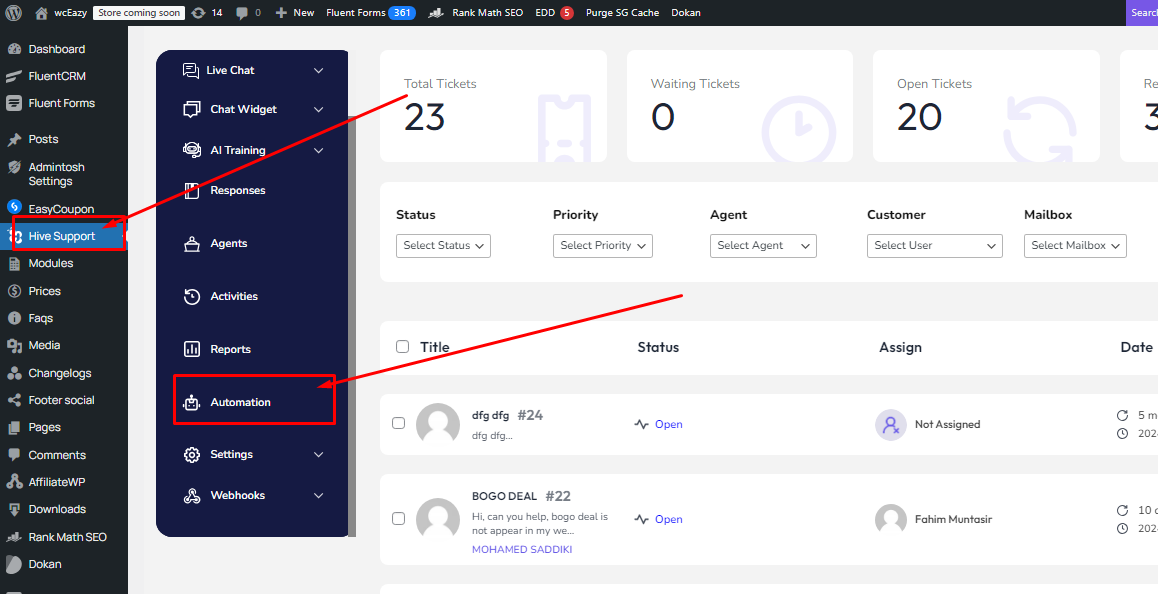
- Check the existing automation or prepare to create something new.
Step 2: Create a New Automation
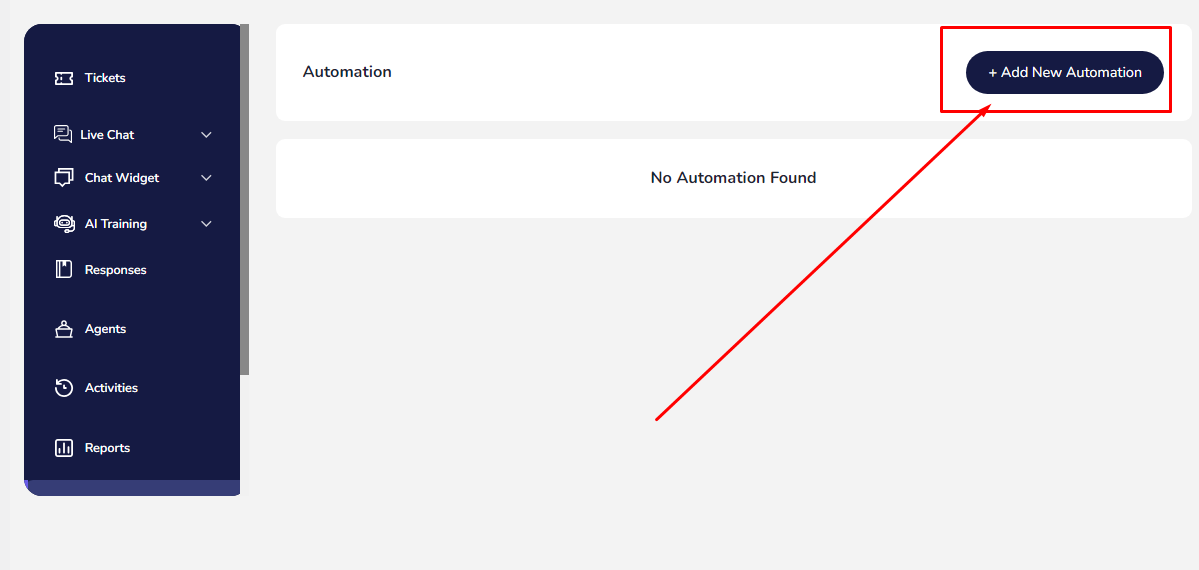
- Tap Add New Automation (top-right of the page).
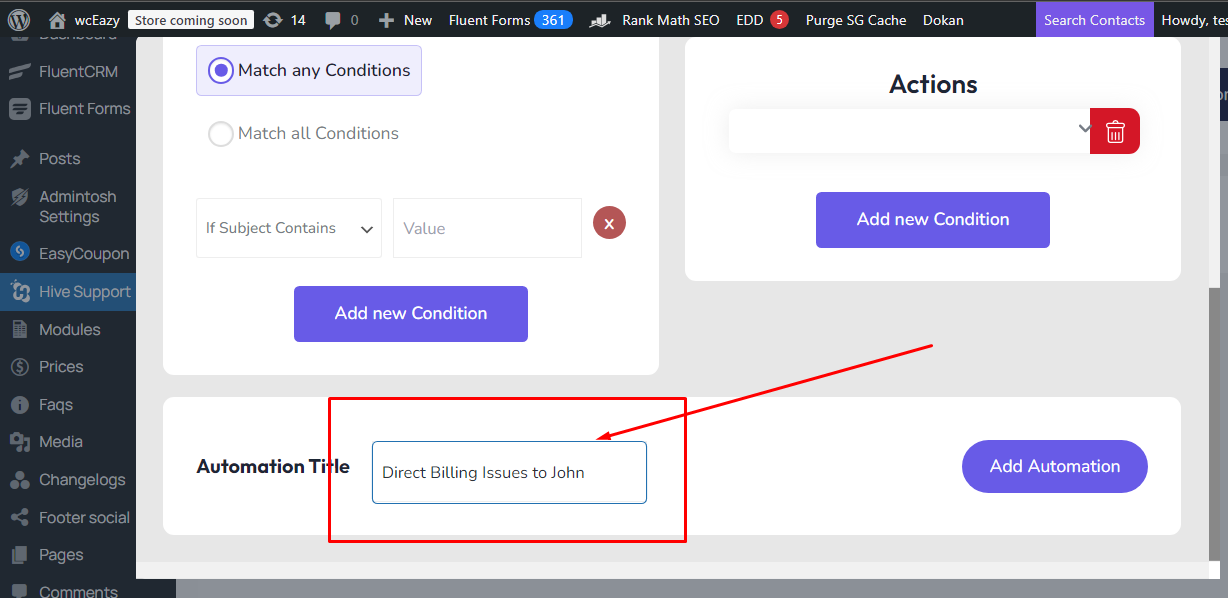
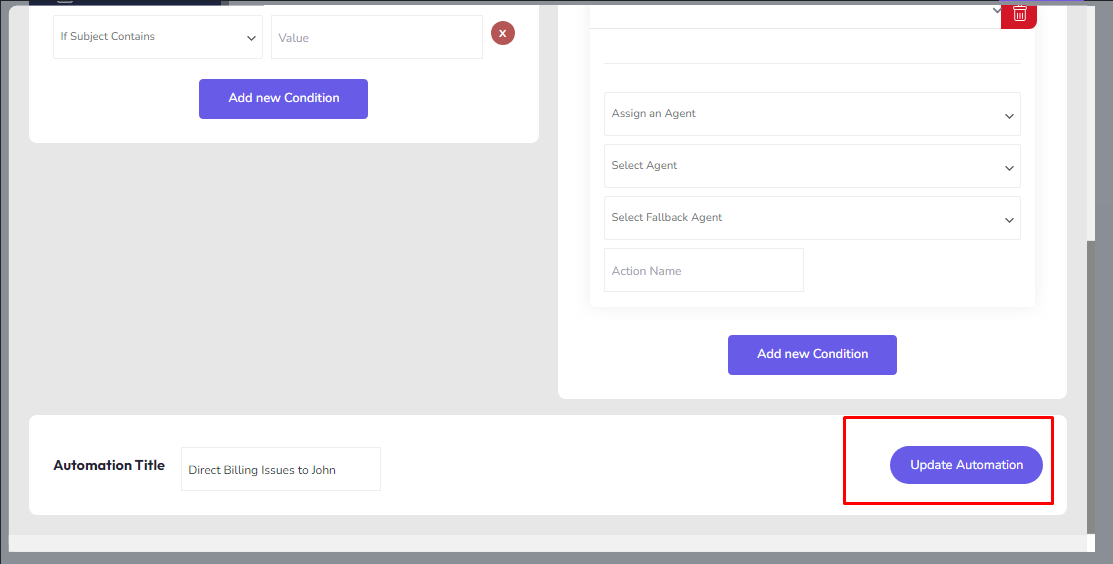
- Give it a name. Something descriptive like “Direct Billing Issues to John.” Remember, a clear title helps.
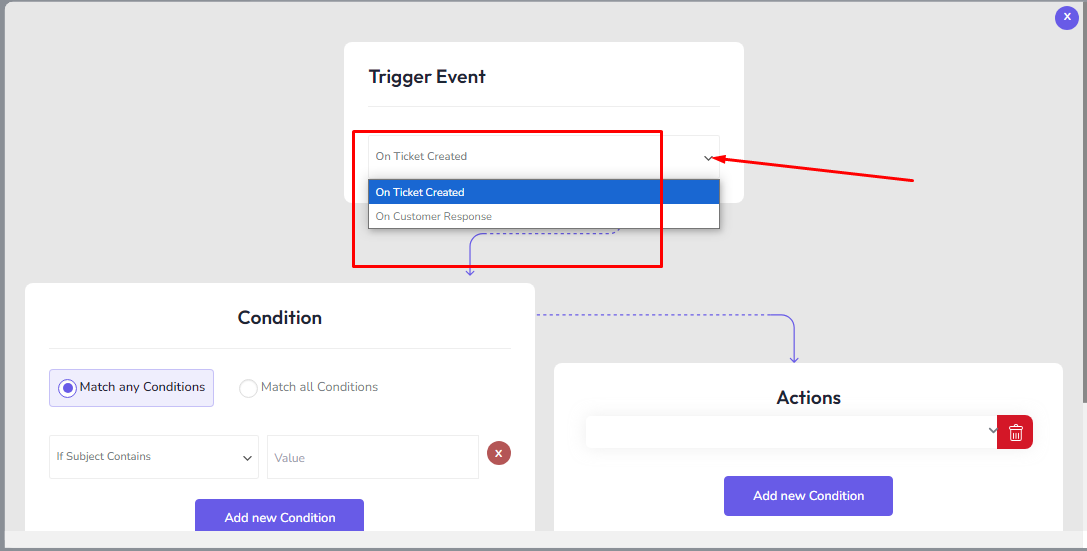
Step 3: Set up the Trigger Event
The trigger event is the action that initiates the automation. Here are the options Hive gives:
- On Ticket Created: This automation fires when a new ticket arrives.
- On Customer Response: When a customer responds, this setting takes action.
Step 4: Define Conditions
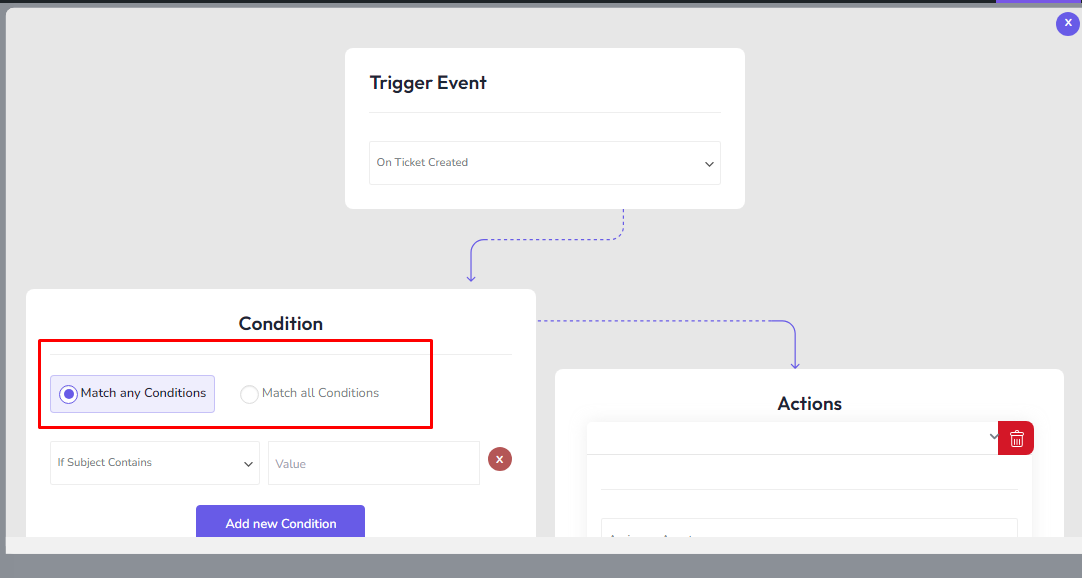
Make your automation specific by setting limits or rules:
- Pick Match Any Conditions (if one rule fits) or Match All Conditions (all rules must fit).
Choose criteria:
- If Subject Contains: Keywords in the ticket’s subject. (Consider any number of keywords you need)
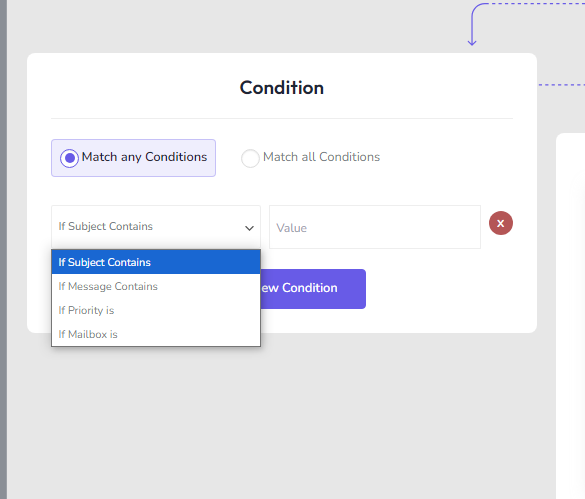
- If Message Contains: Search for terms inside the ticket’s body.
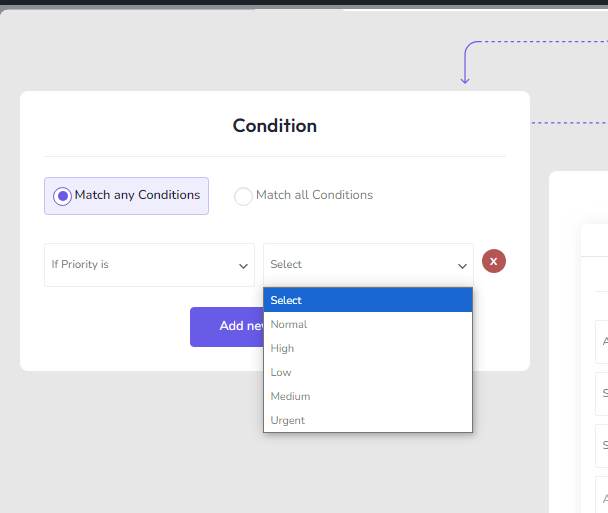
- If Priority is: Restrict by priority.
- If Mailbox is: Focus on a mailbox, like Support or Sales.
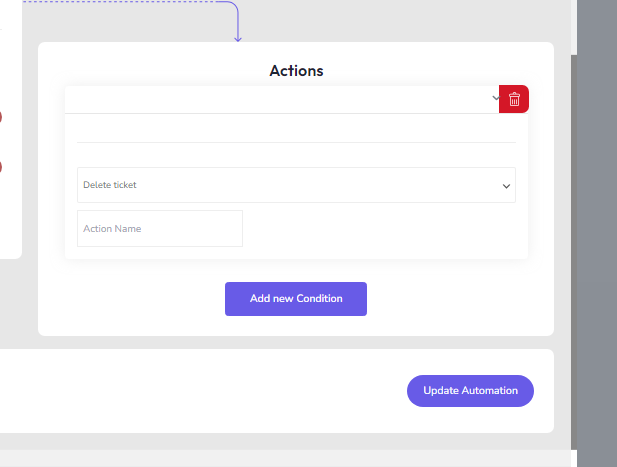
Step 5: Configure Actions
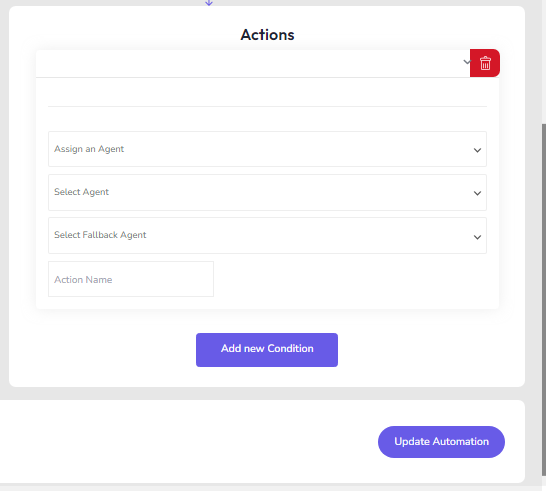
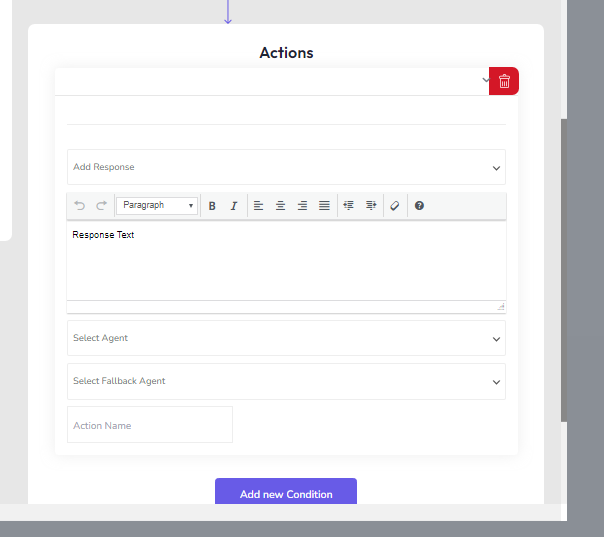
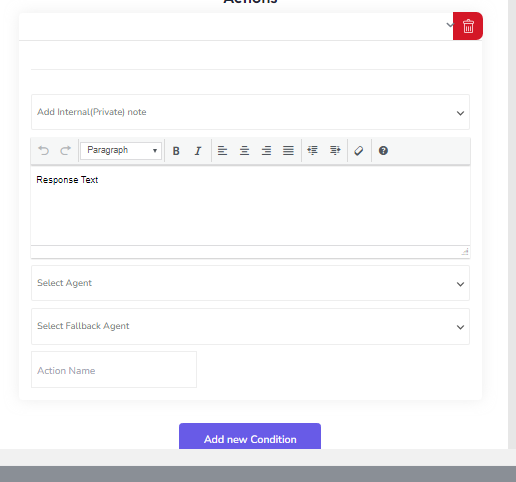
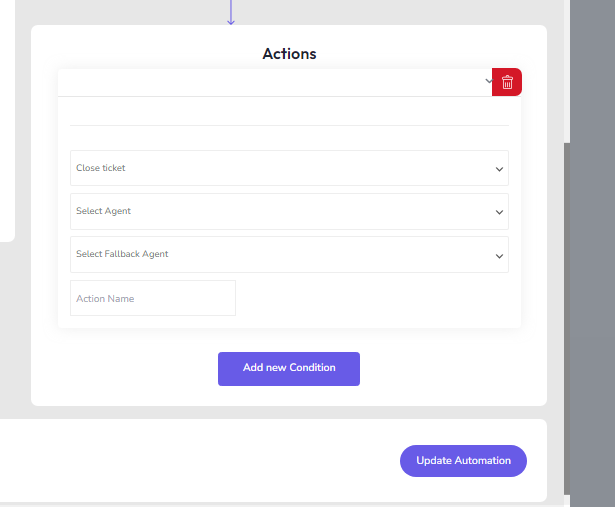
Actions decide what happens next when all matches line up. Your options:
- Assign an Agent: Route tickets to someone specific.
- Add Response: Automatically message customers.
- Add Internal Note: Leave notes for your team.
- Close Ticket: Wrap it up and mark it done.
- Delete Ticket: Remove it from the system.
Step 6: Save and Activate the Automation
- Double-check everything.
- Hit Add Automation/Update Automation. And now, it’s live.
Automated Customer Service Examples Using Hive Support
1. Automated Ticket Assignment
Scenario: Assign tickets to the most appropriate agent based on the issue type or department.
Trigger: On ticket created
Conditions:
- If Subject Contains: “Billing Issue”
- If Mailbox is: “Billing Department”
Actions: - Assign an agent: Billing Specialist
- Add Internal Note: “Billing-related ticket assigned to Billing Specialist.”
2. Instant Response to Common Queries
Scenario: Automatically respond to frequently asked questions (FAQs) to reduce response time.
Trigger: On ticket created
Conditions:
- If Subject Contains: “Password Reset”
- If Message Contains: “forgot password”
Actions: - Add Response: “Hello, here’s a link to reset your password: [Password Reset Link]. If you need further assistance, please let us know!”
- Assign an agent: Support Team
3. Escalation for High-Priority Issues
Scenario: Escalate urgent tickets to senior support staff.
Trigger: On ticket created
Conditions:
- If Priority is: High
Actions: - Assign an agent: Senior Support Agent
- Add Internal Note: “High-priority ticket escalated to Senior Support.”
4. Follow-up on Customer Responses
Scenario: Automatically follow up when a customer replies to a ticket.
Trigger: On customer response
Conditions:
- If the Message Contains: “not resolved”
Actions: - Add Response: “We’re sorry to hear your issue isn’t resolved. Our team is looking into it and will get back to you shortly.”
- Assign an agent: Original Agent
If you want to find more examples, we have it right here.
Challenges of Automating Customer Service
The push for automated customer service solutions brings efficiency, but can also bring in some bumps in the road. These aren’t just minor glitches. Anything that affects both the service and the experience, has to be resolved.
Let’s explore them:
Loss of Personal Touch
While bots are swift, they often miss the mark in replicating the warmth of a real human exchange. A mechanical response cannot replace the genuine care a live agent can offer.
Try to bring in an AI that bridges the emotional gap while responding.
Technical Limitations of AI and Automation
Despite all its promises, AI sometimes hits its limits. A customer’s need might be so specific, or the issue so complex, that the automation feels more like a barrier than a help.
Seamless transitions between automated and live support are essential for maintaining a positive experience.
High Implementation and Maintenance Costs
You might think that automation will save costs, but the hidden truth is that getting it up and running—and maintaining it—can be expensive. Ongoing maintenance puts a toll on your business if the ROI isn’t much.
Impact on Business Operations
Smaller businesses might feel the sting of automation’s cost more acutely, while larger ones can absorb it. So, for startups and small businesses, begin with cloud-based, modular systems that can scale with growth.
Impact on Employee Morale and Job Roles
If not managed carefully, automation can create an environment where workers feel less valued or even replaceable. The technology might seem like a rival rather than a partner for some employees.
Data Privacy and Security Concerns
With more customer data being processed by automation tools, the risk of data breaches increases. This is why, encryption, compliance with data protection laws, and clear transparency about data usage will help ensure customers feel safe.
When Automation Might Not Be the Best Solution
Automation is good, but what if it’s not a good option for your business? Below, you’ll find scenarios illustrating where automation might fall short:
| Scenario | Why Automation May Not Work |
| Complex or Highly Technical Issues | Automation falters when depth and expertise come into play. Pre-set workflows can misfire when troubleshooting intricate and personalized setups. |
| Emotional or Sensitive Customer Interactions | An AI response won’t feel genuine during delicate exchanges. |
| Preference for Human Interaction | In areas where trust and harmonious relationships are non-negotiable. |
| Onboarding and Relationship Building | A guided, personalized experience matters here. |
| Dynamic or Rapidly Changing Scenarios | Real-world shifts can easily bypass rigid workflows, delaying effective responses. |
| Low-volume or Niche Requests | Without sufficient data to train, some cases often result in overly broad or irrelevant responses. |
| Language and Cultural Scenes | AI automation might not pick up on slang or regional/cultural contexts in conversations. While those are rare in client communications, there are chances of such scenarios happening. |
| Data Sensitivity and Security Concerns | Customers handling private matters may distrust automated systems. Use live chat for that. |
What’s Coming Next in Customer Service Automation
Automated customer services are rapidly changing. We’re at a crossroads, where the future is written in AR, blockchain, AI, and self-healing systems. So, what will that look like?
Here are five powerful customer service automation that are coming our way:
Augmented Reality (AR) for Customer Support
AR is being used to make customer support more engaging. Instead of just reading instructions or talking through an issue, AR brings a hands-on experience by showing visual guides and allowing customers to solve problems in real-time.
Blockchain Integration for Secure Transactions
Whether it’s for handling returns, tracking customer rewards, or resolving complaints, the use of blockchain in customer experience automation ensures everything is safe and traceable.
Advanced NLP for Multilingual and Contextual Understanding
Forget simple responses. It’s not only about translating languages anymore; Proper NLP optimization can grasp context and intent. This leads to clearer and more effective responses.
Extended Reality (XR) in Customer Service Experiences
XR is the next frontier, combining VR and AR to redefine how customers interact with support. Virtual consultations, product trials, or step-by-step guidance are now possible in fully interactive environments.
Self-Healing Systems in Customer Service Platforms
These smart systems can detect issues and resolve them automatically, preventing disruptions and keeping the service running smoothly without regular human intervention.
Frequently Asked Questions
Which Tools Should I Use To Automate?
Consider using tools like Hive Support for smooth automation. It combines ticketing, AI chatbots, and analytics, all in one, simplifying your workflow. Remember, always choose tools that are scalable, and provide ease of integration. Plus, they can adapt and meet your business needs.
What Tasks Should I Automate?
Tasks that repeat endlessly—like routing tickets, handling FAQs, and data entry—are perfect for automation. Hive Support is excellent at automating these, letting agents focus on the tough, complex stuff.
How Do I Balance Tech With Human Service?
Well, it’s really a basic thing to do. Know your audience, and resonate with them. If something needs a live chat feature, don’t go for the automated support for that. Take customer feedback, and improve accordingly.
Is Automation Really Cost-Effective?
Very, actually. With tools like Hive Support, automation reduces operational costs by handling repetitive tasks, minimizing errors, and speeding up resolutions. You will see improved efficiency, reduced labor costs, and enhanced customer satisfaction.
How do I create a helpdesk system?
To create your helpdesk, choose software like Hive Support, Zendesk, or Freshdesk. Now, set communication paths like email, chat, and phone, and then automate your routing. You require a continuous team adaption process to perfect your customer needs.
Conclusion
Well, this is it for today. Hope now you know what automated customer service is and how to get one up and running for your business.
Chatbots, AI, and predictive tools tackle repetitive tasks and allow agents to focus on deeper, more human-like interactions. On top of that, better speed and precision. But here’s the thing: while technology can efficiently handle mediocre task requests, it’s still human responses that seal the deal.
Automation doesn’t replace connection—it amplifies it. Real-time insights gathered from data can speed up resolutions, refine service, and give customers exactly what they need when they need it.
0 thoughts on “How to Automate Customer Service for All Business Types!”